 Crawllexa
An SEO audit is a structured review of everything that affects how a site performs in search: whether search engines can crawl and index it, whether its pages match what people are searching for, whether the content deserves to rank, and whether anything is actively holding it back. The output isn’t a score. It’s a short, prioritized list of what to fix, in what order, and why.
A detailed audit isn’t the one that finds the most issues. Any crawler can produce hundreds of warnings on a perfectly healthy site. Detail means every finding is tied to evidence and to the pages that matter: which URLs are affected, how much traffic or revenue they carry, what the fix is, who does it, and how you’ll know it worked. Google’s own advice on hiring an SEO sets the same bar: an audit should give you realistic estimates of improvement and an estimate of the work involved.
This guide walks through the audit we’d run on any site, in the order we’d run it, using free tools wherever possible. It ends with what a good audit report includes and a checklist you can work from.
The short version
- Start with data, not a crawler. Search Console shows where your traffic comes from and what changed. The pages that earn traffic, and the ones that should, get audited first.
- Rule out emergencies before anything else: manual actions, security issues, robots.txt blocks, a stray
noindex, a server that fails for crawlers. - Crawl the site and compare three lists: what the crawler finds, what your sitemap claims and what Search Console says is indexed. The gaps between them are where most technical problems hide.
- Most tool warnings don’t matter. Google says third-party tools don’t have access to its internal ranking data. Check a tool’s recommendations against official guidance before you act on them.
- Content is half the audit. Every page should earn its place: keep it, improve it, merge it or retire it, based on what it does for searchers.
- Prioritize by impact, effort and page value. One template fix that repairs thousands of pages beats fifty one-off fixes.
- The report is the deliverable: a summary, evidence, priorities, owners and a roadmap, not a PDF of warnings.
What an SEO audit covers
| Area | The question it answers | Where to look |
|---|---|---|
| Performance | Where does search traffic come from, and what changed? | Search Console Performance report, your analytics |
| Crawling | Can search engines reach every page that matters? | Crawl stats and robots.txt reports, a site crawler |
| Indexing | Are the right pages indexed, and the wrong ones kept out? | Page indexing report, URL Inspection, Sitemaps report |
| Rendering and mobile | Do crawlers see the same content as people, on mobile? | URL Inspection live test |
| Page experience | Is the site fast, stable and secure for real visitors? | Core Web Vitals report, PageSpeed Insights |
| Site structure | Can people and crawlers reach important pages through links? | A site crawler, the Links report |
| On-page | Does each page match its search intent and present itself well in results? | Crawl data, Performance report, the results pages |
| Content | Which pages deserve to rank, which need work, and what’s missing? | A content inventory joined with traffic data |
| Structured data | Is markup valid, and does it match the page? | Rich result reports, Rich Results Test |
| Links and reputation | Who links to the site, and is anything risky? | Links report, Manual actions report |
| Local, international and AI search | Are locations, languages and AI visibility set up and measured? | Business Profile, hreflang checks, Search Console’s generative AI report |
Before you start: goal, access and tools
Set the goal. Why this audit, and why now? A traffic drop, a planned redesign, a new SEO provider and an annual health check need different depths. A site about to migrate needs every URL mapped; a site that lost traffic last month needs the drop explained first.
Get access. You need Search Console, ideally Bing Webmaster Tools, your analytics, and read access to the CMS. For large sites, server logs show what crawlers actually request. If someone outside your business is doing the audit, Google’s advice is to grant read access to Search Console only, not write access.
Pick your tools. Most of an audit can be done for free:
- Google Search Console for performance, indexing, Core Web Vitals, structured data, links, manual actions and security issues.
- Bing Webmaster Tools, whose Site Scan feature crawls your site on demand and checks for common technical SEO issues.
- A site crawler. Screaming Frog’s free version, for example, crawls up to 500 URLs, which covers many small business sites.
- PageSpeed Insights and the Rich Results Test for individual pages.
- Our free tools for specific checks: the SERP Preview for titles and descriptions, the AI Crawler Checker for robots.txt rules, the Schema Generator for structured data and the Content Analyzer for drafts.
Record a baseline. Export clicks, impressions, top queries and top pages for the last 16 months, the most Search Console keeps. Without a baseline, you can’t show what the fixes changed.
Step 1: Start with performance data
Open the Search Console Performance report, set the date range to the last 16 months, and compare the last three months year over year. Google’s guide to debugging traffic drops recommends exactly this, because a 16-month view separates real problems from seasonal dips that happen every year.
Then build the list of pages that matter. It has two halves: pages that already earn clicks, and pages that should, such as service, product and category pages that bring in revenue. The rest of the audit is prioritized around this list.
Look for patterns, not single numbers:
- Clicks and impressions both down points to lost rankings, lost indexing or falling demand. Google lists the usual causes as algorithmic updates, technical issues, security issues, spam issues, seasonality and changing interests, and site moves.
- Impressions steady but clicks down suggests a snippet problem. Google’s guide says this pattern can mean your title and snippet aren’t the best they could be, or that other results have a more appealing rich result.
- A drop limited to some pages, queries, countries or devices narrows the search. Compare each dimension, one tab at a time.
- Demand changes show up in Google Trends. If a query fell everywhere, not only for you, there’s nothing on your site to fix.
Since August 2026, Search Console also has generative AI performance reports that show how often your pages appeared in AI Overviews and AI Mode, by page, country and device. Note the baseline there too.
Step 2: Rule out emergencies
These are rare, but each one can wipe out traffic on its own, so check them before anything else:
- Manual actions report. Any manual action is the first fix, and the report explains how to request reconsideration afterward.
- Security issues report. Hacked content or malware leads to browser warnings that drive visitors away.
- Crawl stats report, host status. It shows whether Google had trouble fetching robots.txt, resolving DNS or connecting to your server in the past 90 days.
- robots.txt. Make sure it isn’t blocking important sections, and that it returns a 200 or 404 status, never a server error. The robots.txt report in Search Console shows what Google fetched; our AI Crawler Checker shows what each rule allows.
- Stray
noindextags and canonicals, usually left behind by a staging site or a redesign. Inspect the home page and your five most important pages with the URL Inspection tool.
Step 3: Crawl the site
Crawl the site from the home page with a site crawler, then compare three lists: the URLs the crawler found, the URLs in your XML sitemap, and the URLs Search Console reports as indexed.
- In the sitemap but not found by the crawl: orphan pages that nothing links to. Link them or retire them.
- Found by the crawl but not in the sitemap: pages that should be listed, or pages that probably shouldn’t exist, such as filter and sort variants.
- Indexed but not in either: old URLs, parameter variants and leftovers that need redirects or removal.
From the crawl itself, pull out:
- Status codes: internal links to 404s, any 5xx responses, redirect chains and loops, and links that point to redirected URLs instead of the final one.
- Duplicate URL variants:
httpandhttps,wwwand non-www, trailing slashes and parameters that serve the same page. Each should redirect to one version. - Click depth: important pages should be reachable within a few clicks of the home page.
- Rendering differences: if the site relies on JavaScript, compare the raw HTML with the rendered HTML for content, links, titles and canonicals.
Our technical SEO guide explains each of these in depth, including how to fix them.
Step 4: Check indexing
Open the Page indexing report with the right goal in mind. Google’s documentation for the report says the aim is to get the canonical version of every important page indexed, and that you shouldn’t expect every URL on your site to be indexed. Duplicates and alternates being excluded is usually a sign things are working.
The reasons you’ll see most often, and what they usually mean:
| Status | What it means | What to do |
|---|---|---|
| Crawled - currently not indexed | Google crawled the page but didn’t index it, and it may or may not later | If important pages sit here, check whether they’re thin, duplicated or weakly linked |
| Discovered - currently not indexed | Google found the URL but delayed crawling it, typically to avoid overloading the site | Check server performance and internal links, and whether the site generates too many low-value URLs |
| Duplicate without user-selected canonical | Google treats the page as a duplicate and chose another URL as canonical | Fine if the choice is right; set a canonical if it isn’t |
| Duplicate, Google chose different canonical than user | Your canonical tag and Google’s choice disagree | Inspect both URLs and make your signals consistent: canonicals, links, sitemaps, redirects |
| Alternate page with proper canonical tag | The page correctly points to an indexed canonical | Nothing |
| URL marked ‘noindex’ | The page asks not to be indexed | Fine if intended; remove the tag if not |
| Soft 404 | The page looks like an error page but returns a 200 status | Return a real 404 for missing pages, or add real content |
| Not found (404) and Page with redirect | The URL is gone or moved | Fine if intended; update internal links that still point to it |
For each important page, run the URL Inspection tool. It shows whether the page is indexed, which canonical Google selected, when it was last crawled, and, with a live test, a screenshot and the rendered HTML. Finally, check the Sitemaps report: your sitemaps should list only canonical, indexable pages that return a 200 status.
Step 5: Check rendering and mobile
Google uses the mobile version of a site’s content, crawled with its smartphone crawler, for indexing and ranking. Check that your mobile pages carry the same content, links, headings, structured data and metadata as desktop. Content hidden or dropped on mobile is, for indexing purposes, content you don’t have.
Use the URL Inspection live test on a few pages of each template. The screenshot shows what Google rendered; the rendered HTML shows whether content and links injected by JavaScript made it through.
Step 6: Check page experience
The Core Web Vitals report in Search Console uses real-user data from the Chrome User Experience Report, grouped by similar pages, for the last 28 days. The targets, measured at the 75th percentile of page loads, are a Largest Contentful Paint within 2.5 seconds, an Interaction to Next Paint of 200 milliseconds or less and a Cumulative Layout Shift of 0.1 or less.
Work by template, not by URL. A failing product template affects every product page, so it outranks a slow one-off page. Use PageSpeed Insights to diagnose individual URLs, and remember that a perfect lab score matters far less than real users passing on the pages that carry traffic. While you’re there, confirm every page is served over HTTPS without mixed content, and that no pop-ups block the content on mobile.
Step 7: Review site structure and internal links
From the crawl data, check:
- Orphan pages that no internal link reaches.
- Important pages buried deep, many clicks from the home page.
- Navigation and breadcrumbs that reflect how your business is organized, so related pages link to each other.
- Anchor text that describes the destination, rather than “click here”.
- Links that crawlers can follow: real
<a href>links, not click handlers.
The Links report in Search Console shows your most-linked internal pages. If the pages you care about most aren’t near the top, your internal linking is pointing attention somewhere else. Our on-page SEO guide covers internal links and anchor text in detail.
Step 8: Audit on-page elements on the pages that matter
On every page in your priority list, review:
- Title tags: missing, duplicated, cut off, or out of step with the H1. Google writes the title link shown in results and often rewrites titles that don’t describe the page well.
- Meta descriptions: missing or duplicated. They don’t affect rankings, but they can shape the snippet and the click.
- Headings: one clear H1 that states the topic, and headings that outline the page.
- Intent match: search the page’s main query and compare. If the top results are guides and your page is a sales page, or the other way round, no amount of tag tuning will close the gap.
- Click-through rate outliers: in the Performance report, pages with strong impressions and positions but weak clicks are usually snippet problems. Test new titles and descriptions in our SERP Preview before you publish them.
Step 9: Audit the content
List every indexable page with its clicks, impressions, conversions, backlinks and last update date. Then decide what to do with each one:
| Decision | When | How |
|---|---|---|
| Keep | The page serves its searchers well and performs | Leave it, and refresh it when facts change |
| Improve | It targets a real need but underperforms | Rewrite for intent, depth and accuracy; add evidence and first-hand detail |
| Merge | Several pages serve the same need and compete with each other | Combine into the strongest page and redirect the others to it |
| Retire | It serves no one, gets no traffic and has no links | Redirect it to a close equivalent if one exists; otherwise return a 404 or 410 |
Look for keyword cannibalization while you’re here: queries in the Performance report where two or more of your pages take turns ranking. Our cannibalization guide covers the fix.
Judge quality against Google’s own questions for helpful, reliable, people-first content, which ask, for example, whether a page provides original information, analysis or research, and whether readers would leave feeling they learned enough. The same guidance suggests auditing any drops you’ve seen: which pages were most affected, and for which types of searches.
One warning: removing content isn’t a ranking trick. Google’s guidance says adding or deleting lots of content to make a site seem fresh won’t help its rankings. Retire pages because they don’t serve anyone, not to “prune” your way to better rankings.
Finally, note the gaps: important questions your customers search for that no page answers. Those become the content plan, and our keyword clustering guide shows how to turn them into a list of pages.
Step 10: Check structured data
Search Console has a rich result report for each supported type it finds on your site, showing valid items and errors. Use the Rich Results Test on individual templates. Check three things: the markup is valid, it describes content that’s actually visible on the page, and it uses types that still produce rich results. Google supports only a subset of schema.org types for rich results. Our Schema Generator flags the ones it has retired.
Step 11: Review links and reputation
The Links report shows your top linking sites, your most-linked pages and the most common link text. It’s a sample, not a complete list, and its tables stop at 1,000 rows, so treat it as an overview.
Check the Manual actions report for unnatural links. If there’s nothing there, you almost certainly don’t need to disavow anything. Google’s disavow documentation says that in most cases it can assess which links to trust on its own, and that you should disavow only when you have a considerable number of spammy or artificial links and they’ve caused, or are likely to cause, a manual action. A third-party “toxic links” score on its own isn’t a reason to disavow.
For the positive side of reputation, such as earning links, mentions and reviews, see our off-page SEO guide.
Step 12: Check local, international and AI search
Only some of this applies to every site, but none of it should be skipped where it does:
- Local businesses: a complete, accurate Business Profile, consistent name, address and phone details across the web, and location pages with genuinely local content. Our local SEO page covers what that involves.
- International sites: reciprocal hreflang annotations, one language or country per URL, and no automatic redirects based on location that stop crawlers reaching other versions. See the international section of our technical SEO guide.
- AI search: robots.txt rules that match your choices about AI crawlers, content structured so that individual passages can stand alone, and the generative AI performance report as your baseline. Our AEO and GEO guide explains what affects citations.
Step 13: Prioritize the findings
Score each finding on three things: impact (what it does to crawling, indexing, rankings or clicks), effort (how much work the fix takes, and whose) and value (how much traffic or revenue the affected pages carry). Then sort:
| Priority | What qualifies | Examples |
|---|---|---|
| Fix now | Blocks important pages from being crawled, indexed or trusted | Manual action, security issue, sitewide noindex, robots.txt blocking key sections |
| Fix next | Wastes crawling or splits signals across many pages | Duplicate URL variants, redirect chains, inconsistent canonicals, cannibalizing pages |
| Plan | Pages work but underperform | Failing Core Web Vitals on a key template, weak intent match, thin content on priority pages |
| Ignore or batch | Little or no search impact | Missing meta descriptions on noindex pages, HTML validation warnings, cosmetic tool scores |
Our technical SEO guide has a more detailed four-tier version for technical issues. Whatever framework you use, group fixes by owner, such as developer, content writer or marketing, so every finding lands with someone who can act on it.
What a detailed SEO audit report includes
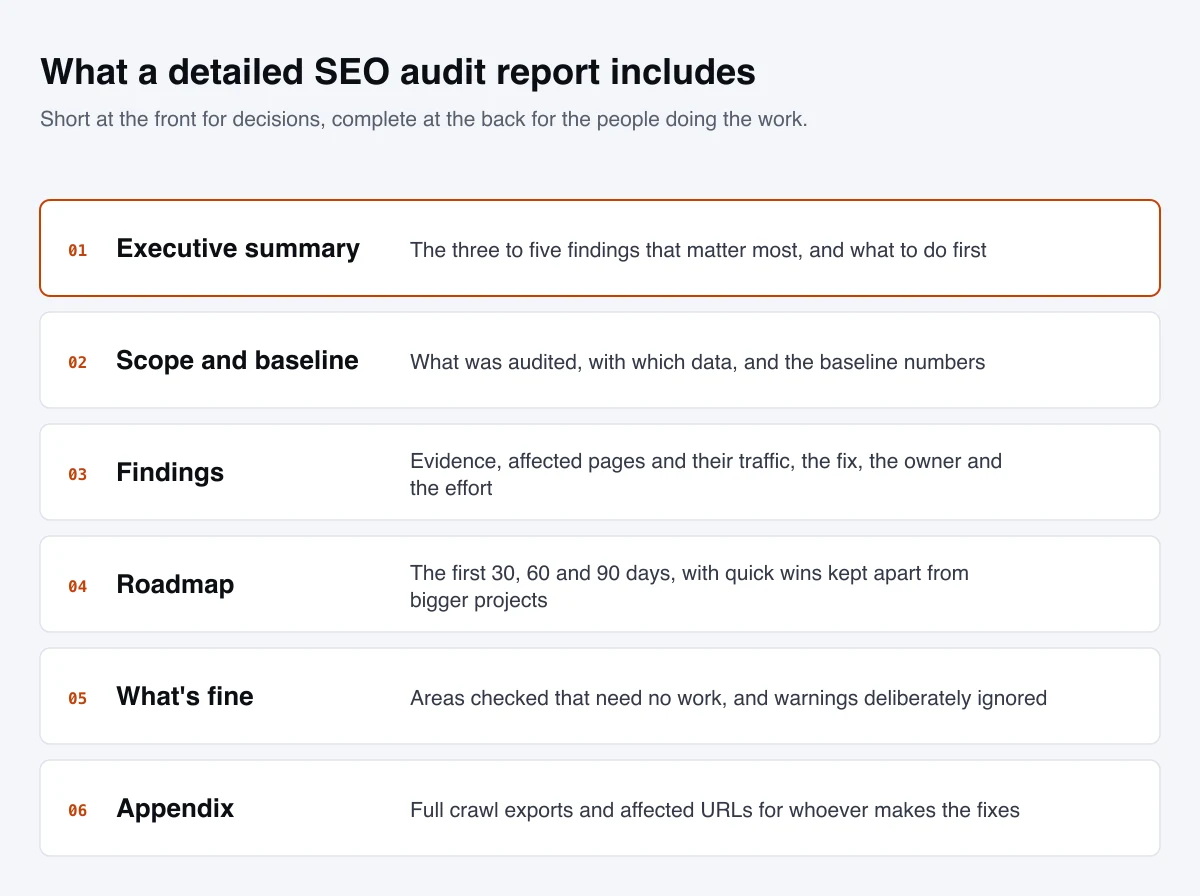
A good report is short at the front and complete at the back:
- Executive summary. The three to five findings that matter most, in business terms, and what to do first. Someone who reads only this page should know what to approve.
- Scope and baseline. What was audited, when, with which data, and the baseline numbers the fixes will be measured against.
- Findings with evidence. For each one: what’s wrong, example URLs and screenshots, the affected pages and their traffic, the fix, the owner, the effort and how you’ll confirm it’s fixed.
- A prioritized roadmap. What happens in the first 30, 60 and 90 days, with quick wins separated from projects that need development time.
- What’s fine. Areas that were checked and need no work, so nobody spends time on them, and warnings that were deliberately ignored, with the reason.
- Appendix. Full crawl exports and lists of affected URLs, for whoever implements the fixes.
What a report shouldn’t be is a tool export sorted by the tool’s own severity labels, a single “SEO score”, or a promise. Google is blunt about promises: if someone guarantees their changes will put you first in search results, its advice is to find someone else. Tool scores deserve the same skepticism. Lighthouse’s meta description check, for example, fails only when a description is missing or empty, and doesn’t evaluate its quality at all.
Doing it yourself or hiring help
Google’s view is that if you run a small local business, you can probably do much of the work yourself, starting with its SEO Starter Guide. A careful owner with Search Console and a free crawler can cover most of this checklist.
Outside help pays for itself where mistakes are expensive: redesigns and migrations (Google calls a planned redesign or launch a great time to hire, the earlier the better), large catalogs, JavaScript-heavy sites, international setups and manual actions. If you hire, ask the questions Google suggests: whether recommendations cite official documentation, what results to expect and when, and how changes will be communicated.
We offer both routes. Our free SEO audit is a lighter review of the technical and on-page basics, sent back as a prioritized list. Our full SEO audit service adds the complete crawl, content and competitive analysis, and a 90-day roadmap with a walkthrough of the findings.
Common SEO audit mistakes
- Chasing a tool’s score instead of the pages that earn traffic.
- Auditing without Search Console, which means guessing at what Google already tells you.
- Treating every non-indexed URL as a problem. Excluded duplicates and filter pages are usually the system working.
- Fixing everything at once, so nobody can tell which change helped or hurt.
- Disavowing links because a tool called them toxic, with no manual action in sight.
- Deleting content to “prune” for rankings rather than because it serves no one.
- Leaving findings without an owner or a deadline, which is how good audits end up unimplemented.
An SEO audit checklist
Performance
- 16 months of Search Console data exported as a baseline
- Year-over-year comparison by query, page, country and device
- Priority pages listed: those that earn traffic and those that should
- Generative AI performance report reviewed
Emergencies
- No manual actions or security issues
- Host status healthy: robots.txt fetching, DNS and server connectivity
- robots.txt returns 200 or 404 and blocks nothing important
- No stray
noindexor canonical on key pages
Crawling and indexing
- Crawl, sitemap and indexed URL lists compared; orphans fixed
- No internal links to 404s or redirects; no redirect chains
- One version of every URL: protocol,
www, trailing slash, parameters - Page indexing statuses understood; important pages indexed with the right canonical
- Sitemaps list only canonical, indexable 200 URLs
Rendering and experience
- Mobile pages carry the same content, links and markup as desktop
- Rendered HTML contains the content and links
- Core Web Vitals pass on the main templates
- HTTPS everywhere, no intrusive pop-ups on mobile
Pages and content
- Unique, descriptive titles and descriptions on priority pages
- Each priority page matches the intent of its main query
- Every page has a decision: keep, improve, merge or retire
- No cannibalizing pages; content gaps listed
- Structured data valid, visible and of supported types
Links and reach
- Links report reviewed; disavow only if there’s a manual action risk
- Local, international and AI search setup checked where relevant
Report
- Executive summary, evidence, owners, effort and a 30-60-90 day roadmap
Where an audit fits
An audit is diagnostic. It doesn’t move rankings by itself; the fixes do. Its value depends on what happens next, which is why the most useful audits are written for the people who’ll implement them. The findings usually feed straight into technical SEO work, on-page optimization of priority pages and a content strategy built around the gaps. If you’d like a second pair of eyes first, start with a free SEO audit.