 Crawllexa
Technical SEO is the work that makes sure search engines can find your pages, fetch them, render them, understand them and store them in their index, and that those pages load quickly and work properly on every device. It isn’t about what your content says. It’s about whether machines can reach that content at all, and whether they end up with the version you intended.
It’s the foundation everything else stands on. A brilliant page that returns the wrong status code, sits behind a robots.txt rule or renders blank without JavaScript has no path into search results, AI Overviews or AI assistants. Google’s own minimum bar is short: Googlebot isn’t blocked, the page returns an HTTP 200 status code, and it has indexable content. Meeting that bar only makes a page eligible, though. The gap between eligible and actually indexed, ranking and cited is where technical SEO lives.
This guide explains how search engines process a site, stage by stage, and what goes wrong at each stage. It’s written for two readers at once: someone who has never opened Search Console, and someone who has run migrations for fifteen years. Every claim that matters links to Google’s documentation or to the research behind it, and we’ve flagged where the guidance changed in 2025 and 2026.
How to read it. If you’re new to technical SEO, read top to bottom. If you’re experienced, the sections on rendering, the Page indexing statuses and prioritization carry the most recent changes, including Googlebot’s 2MB fetch limit and Google’s December 2025 clarifications on JavaScript.
The short version
- Google processes pages in stages: discover, crawl, render, index, serve. Each stage fails in its own ways, and each has its own report in Search Console.
- robots.txt controls crawling, not indexing. To keep a page out of Google, use
noindex, and don’t also block that page in robots.txt, or Google will never see thenoindex. - Canonical tags, redirects and sitemaps are signals, not commands. Google picks the canonical URL. Your job is to make every signal point the same way.
- Google renders JavaScript, and in one large test it rendered every HTML page it crawled, at a median of 10 seconds. But a
noindexin the raw HTML can stop rendering, links must be real<a href>elements, and most AI crawlers don’t run JavaScript at all. - Googlebot reads only the first 2MB of an HTML file for Search, measured uncompressed. Bloated HTML can push content past the cut-off.
- Crawl budget is a real concern only for large or fast-changing sites: roughly a million pages or more, or 10,000+ pages changing daily. For everyone else, problems show up in the Page indexing report.
- Core Web Vitals are used in ranking but are rarely decisive. Only 48% of mobile origins passed all three in 2025, so good scores are still a practical advantage for visitors.
- Most technical issues don’t matter much. Prioritize by whether an issue blocks crawling or indexing, and how many important pages it touches.
What technical SEO covers
Technical SEO is one of three broad areas of search optimization. The lines between them blur, but the questions they answer are different:
| Technical SEO | On-page SEO | Off-page SEO | |
|---|---|---|---|
| The question it answers | Can search engines access, process and store the page? | Does the page clearly answer the search? | Does the rest of the web vouch for it? |
| Typical work | Crawl access, status codes, canonicals, rendering, sitemaps, speed, structured data, migrations | Titles, headings, content, internal anchor text, images | Links, brand mentions, reviews, digital PR |
| Usually done by | Developers and SEOs together | Writers, editors and SEOs | PR, partnerships and SEOs |
Within technical SEO, the work falls into a handful of areas that this guide follows in order: crawlability, rendering, indexability, site architecture, page experience, structured data, and redirects and migrations. Monitoring and prioritization run across all of them.
How Google turns a URL into a search result
Google describes three stages: crawling, indexing and serving. For technical work it helps to split those into five, because discovery and rendering fail in different ways from the rest.
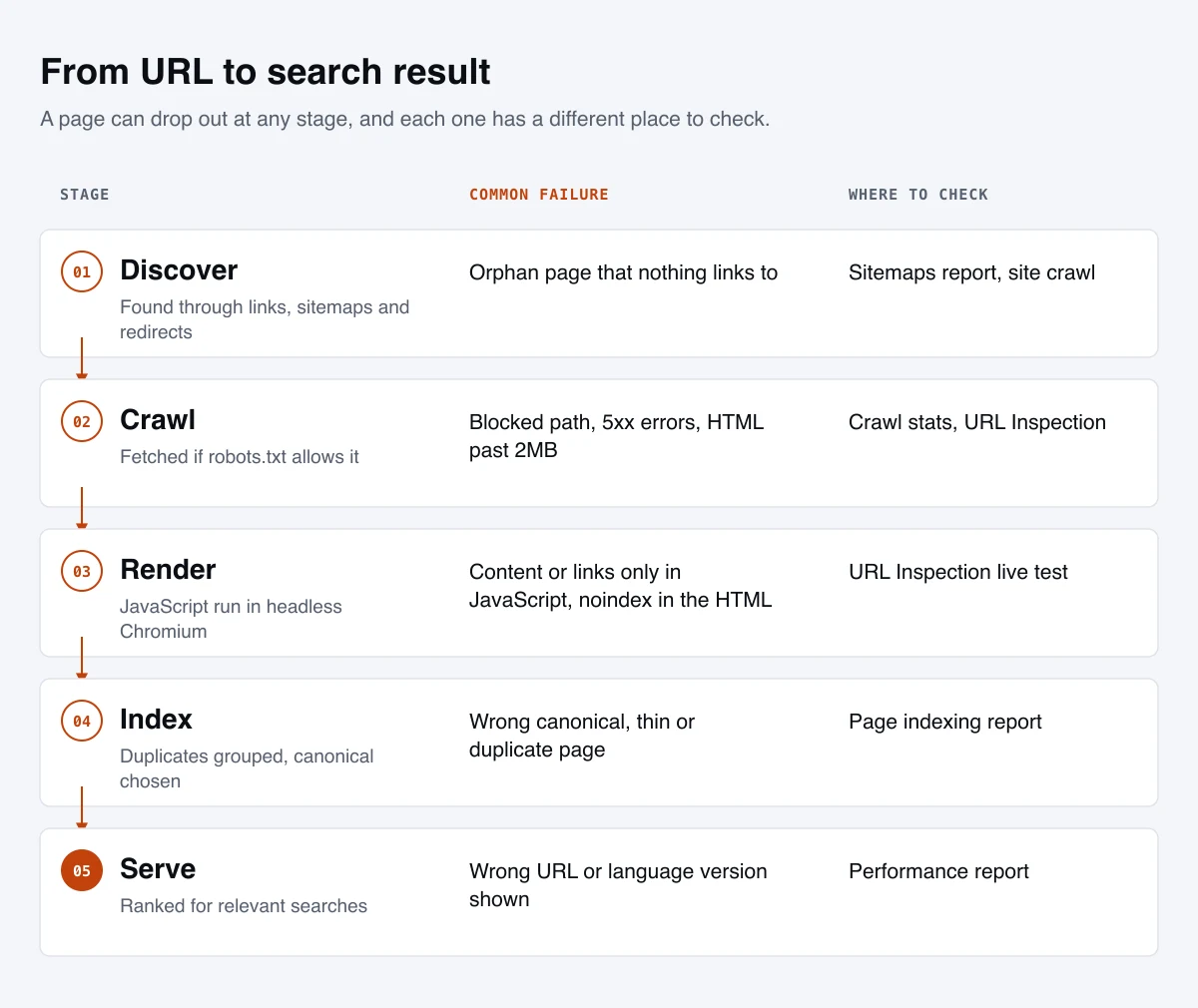
1. Discovery
There’s no central registry of web pages. Googlebot finds new URLs mainly by following links from pages it has already crawled, and also from sitemaps and redirects. A page that nothing links to (an orphan page) can still be found through a sitemap, but it’s treated as less connected to the rest of your site.
2. Crawling
Before fetching a URL, Googlebot checks robots.txt. If the URL is allowed, it requests the page, notes the HTTP status code and downloads the response. A few specifics that matter:
- Google crawls and indexes with its smartphone crawler. This is mobile-first indexing: the mobile version of your content is the version Google uses.
- It follows up to 10 redirect hops before giving up.
- For Google Search, Googlebot crawls the first 2MB of an HTML or other supported text file and the first 64MB of a PDF. The limit applies to uncompressed data, and each CSS or JavaScript file is fetched separately under the same limit. Content past the cut-off isn’t considered for indexing.
- Google’s crawlers support HTTP/1.1 and HTTP/2, and conditional requests using
ETagandLast-Modifiedheaders. If a page hasn’t changed, your server can answer with a 304 and save both sides the work. Google recommends ETag for this.
3. Rendering
Google runs pages through an evergreen, headless version of Chromium to execute JavaScript and see the page as a browser would. Every page that returns a 200 status code is queued for rendering, whether or not it uses JavaScript. We cover the details in the rendering section below, because this is where modern sites most often lose content.
4. Indexing
Google analyzes the rendered page, identifies its main content, groups it with any duplicates, chooses one URL from that group as the canonical, and decides whether to store it. A 200 status code makes a page eligible for this step, but it doesn’t guarantee indexing. Google indexes pages it judges useful, and leaves out duplicates and pages it considers low value.
5. Serving
When someone searches, Google’s ranking systems choose from indexed pages. Serving is mostly the territory of on-page and off-page SEO, but technical problems still surface here. A page that’s indexed under the wrong canonical URL, or that shows the wrong language version to the wrong country, is a technical failure that looks like a ranking problem.
Google’s AI Overviews and AI Mode sit on top of this same index. We cover how those features choose sources in our guide to AEO and GEO.
Bing works the same way, with a few differences
Bing’s pipeline follows the same outline, and it matters more than its search share suggests, because Bing’s index powers Microsoft Copilot and Microsoft is one of the search partners behind ChatGPT search. Two differences are worth knowing. Bing leans heavily on the lastmod date in your sitemap to decide what to recrawl, and asks for full ISO 8601 dates including the time. It also supports IndexNow, a protocol that lets you notify it the moment a URL is added, changed or removed. Verify your site in Bing Webmaster Tools as well as Search Console.
Crawlability: letting search engines in
robots.txt controls crawling, not indexing
A robots.txt file sits at the root of your domain and tells crawlers which paths they may fetch. Google is explicit that it’s a tool for managing crawler traffic, not a way to keep pages out of search. If other pages link to a URL you’ve blocked, Google can still index that URL without visiting it, and show it in results without a description.
How Google reads the file, per its robots.txt specification:
- The most specific rule wins, measured by the length of the path. When an allow and a disallow rule conflict at equal specificity, Google uses the less restrictive one.
- The file is capped at 500 KiB. Anything beyond that is ignored.
- Google caches robots.txt for up to 24 hours, so changes don’t take effect instantly.
- A missing robots.txt is fine. A 404 means there are no restrictions. About 13% of sites have none, according to the 2025 Web Almanac.
- A robots.txt that returns a server error is not fine. For the first 12 hours, Google stops crawling the site. For the next 30 days it uses the last good copy. After that, if the rest of the site is generally reachable, Google behaves as if there’s no robots.txt; if it isn’t, Google stops crawling the site.
- Unsupported rules are ignored. Google doesn’t process
crawl-delay, and anoindexrule inside robots.txt has never been supported.
Two mistakes cause most robots.txt damage. The first is blocking CSS or JavaScript files that pages need to render, which leaves Google looking at a broken page. The second is shipping a staging site’s Disallow: / to production during a launch. Check robots.txt as part of every deployment.
A sensible default for most sites is short:
User-agent: *
Disallow: /cart/
Disallow: /search/

Sitemap: https://www.example.com/sitemap.xml
Block only what genuinely wastes crawling: internal search results, carts and checkouts, filter combinations you never want indexed. Everything else should be crawlable. AI crawlers have their own user agents, and the decision about which to allow is covered in our AEO and GEO guide.
Status codes: tell crawlers the truth
The HTTP status code is the first thing a crawler learns about a page. Using the right one is the cheapest technical SEO there is. Here is how Google handles the ones you’ll see most:
| Status | What it means | How Google treats it |
|---|---|---|
| 200 | Success | Content goes to indexing, which isn’t guaranteed. If the page looks like an error, it’s reported as a soft 404 |
| 301, 308 | Moved permanently | Followed. A strong signal that the target should be the canonical URL |
| 302, 307 | Moved temporarily | Followed. A weak signal that the target should be canonical |
| 304 | Not modified | Google treats the content as unchanged since the last crawl |
| 404, 410 | Not found, gone | Not indexed; previously indexed URLs are dropped. Crawl frequency for the URL gradually falls |
| 401, 403 | Unauthorized, forbidden | Treated like other 4xx errors. Don’t use them to slow crawling; they have no effect on crawl rate |
| 429 | Too many requests | Treated as a server error: crawling slows down |
| 500, 502, 503 | Server errors | Crawling slows in proportion to the errors. Indexed URLs are kept for a while, but persistent errors get them dropped |
Three details catch out experienced teams:
- Soft 404s. A page that says “not found” or shows an empty listing but returns 200 is a soft 404. Google flags it, and it wastes crawling. Return a real 404 or 410.
- 4xx pages don’t waste crawl budget. Google says so directly in its crawling myths. Removing a page and returning 404 is fine. The exception is 429, which Google treats as overload.
- Use 503 for planned downtime. A short maintenance window with a 503 tells Google to come back later. Serving an error page with a 200, or taking the site down without a status code, risks error pages getting indexed.
Internal links: how crawlers find your pages
Google can only reliably follow links that are <a> elements with an href attribute. A <span> with a click handler, a button that changes the view with JavaScript, or an <a> without an href doesn’t count as a link to a crawler, however it behaves for a person.
Beyond crawlability, internal links tell search engines which pages matter. Google notes that pages linked from the home page may be treated as more important and crawled more often, though that doesn’t mean they’ll rank higher. In practice:
- Make sure every page you want indexed is linked from at least one other indexable page, not only listed in a sitemap.
- Keep important pages within a few clicks of the home page through navigation, category pages and contextual links.
- Use descriptive anchor text that says what the target page is about.
- Link to the final URL, not to a URL that redirects.
Faceted navigation and other crawl traps
Filters and sorting on category pages are the single biggest source of wasted crawling on ecommerce and listing sites. Each combination of color, size, price and sort order can create a new URL, and the combinations multiply into an effectively infinite URL space. Google’s faceted navigation guidance describes two harms: crawlers fetch huge numbers of useless URLs, and discovery of new, useful pages slows down.
Google’s recommended options, in order of effectiveness:
- If filtered URLs don’t need to be indexed, block them in robots.txt and let crawlers reach individual products plus an unfiltered listing page.
- Or put filters in the URL fragment (after a
#). Google generally ignores fragments for crawling and indexing. - Canonical tags and
nofollowon filter links are weaker. Google says they’re generally less effective in the long term.
If some filtered pages deserve to rank, such as “red running shoes”, treat them as real landing pages: give them a clean, stable URL, unique content, and links from your navigation. Let the rest stay uncrawlable. Other common traps include calendar pages that generate endless future dates, session IDs in URLs, and internal search results pages that can be linked to. Our ecommerce SEO work spends much of its technical time here.
XML sitemaps
A sitemap is a list of the URLs you want search engines to know about. Google’s sitemap rules:
- A single sitemap can hold up to 50,000 URLs or 50MB uncompressed. Larger sites use several sitemaps and a sitemap index file.
- Use absolute URLs, and list only canonical, indexable URLs that return 200. A sitemap full of redirects, 404s and
noindexpages teaches search engines to trust it less. - Google uses
<lastmod>only if it’s consistently and verifiably accurate. It ignores<priority>and<changefreq>entirely. - Submit the sitemap in Search Console and Bing Webmaster Tools, and reference it in robots.txt.
A sitemap is a hint, not an instruction, and Google says a well-linked site of about 500 pages or fewer may not need one. We still recommend one for almost every site: it’s cheap, it speeds up discovery of new pages, and Bing relies on accurate lastmod values. Our own site generates its sitemap automatically at build time and leaves out pages that shouldn’t be indexed, like the contact form’s thank-you page.
Crawl budget: who actually needs to care
Crawl budget is the set of URLs Google can and wants to crawl on your site. Google’s crawl budget guide is explicit that most sites don’t need to think about it. It’s aimed at roughly three kinds of site:
- Large sites, 1 million or more unique pages, with content that changes about weekly.
- Medium or larger sites, 10,000 or more unique pages, with content that changes daily.
- Sites where a large share of URLs sit in the “Discovered - currently not indexed” status in Search Console.
If you’re in that group, crawl budget comes from two things:
- Crawl capacity, sometimes called host load: how much Google can crawl without overloading your server. It rises when your server responds quickly and consistently, and falls when latency grows or when the server returns 5xx or 429 errors. Every Google crawler shares the same capacity.
- Crawl demand: how much Google wants to crawl. It depends on how many URLs Google knows about, how popular they are and how stale its copies are. Google calls “perceived inventory” the factor you can control most: every duplicate, filter URL or dead-end URL it knows about competes with your important pages.
What helps: removing or blocking duplicate and parameter URLs, fixing soft 404s, shortening redirect chains, keeping the server fast, and supporting conditional requests so unchanged pages return 304. Google also counts embedded resources such as CSS, JavaScript and API calls against crawl budget, and rendering time counts as much as download time.
What doesn’t help, according to Google’s crawling myths page: compressing sitemaps, the crawl-delay rule, nofollow on internal links (the URL can still be found elsewhere), or making trivial edits and date changes to look fresh. Crawling isn’t a ranking signal. More crawling won’t lift rankings on its own; it only makes sure the right pages are processed.
Rendering: what crawlers actually see
How Google renders JavaScript
Google processes JavaScript sites in three phases: crawling, rendering and indexing. It fetches the HTML, queues the page for rendering, runs the JavaScript in headless Chromium, then indexes the rendered result and extracts any links that appeared.
The old fear that Google takes weeks to render JavaScript isn’t supported by recent evidence. In a 2024 study by Vercel and MERJ covering more than 100,000 Googlebot fetches on nextjs.org, every HTML page that returned 200 was fully rendered. The median page was rendered 10 seconds after crawling, the 75th percentile within 26 seconds, the 90th within about three hours and the 99th within about 18 hours. How complex the JavaScript was made no significant difference.
So rendering usually works. What breaks JavaScript sites is a set of specific rules.
The rules that trip up JavaScript sites
- A
noindexin the original HTML can stop rendering. Google may skip rendering a page that starts withnoindex, so removing the tag with JavaScript doesn’t work. Google clarified this in December 2025, and the Vercel study observed the same. If you want a page indexed, don’t shipnoindexin its HTML. - Pages that don’t return 200 may not be rendered. Google also clarified in December 2025 that rendering might be skipped for error pages. Don’t depend on JavaScript to fix up content on a 404.
- Set the canonical in HTML, and don’t let JavaScript change it. Google’s guidance is to set
rel="canonical"in the HTML. If you must use JavaScript, set it to the same URL, or leave it out of the HTML and set it only with JavaScript. Never have two different canonicals. - Links must be
<a href>elements, and routes must be real URLs. Single-page apps should use the History API, not#fragments, to change views. Google can’t reliably resolve fragment-based routes. - Avoid soft 404s in single-page apps. When a client-side route has no content, either redirect with JavaScript to a URL that returns a real 404, or add a
noindexrobots meta tag. - Lazy-load without requiring interaction. Google doesn’t scroll or click. Use native lazy loading or IntersectionObserver so content loads when it enters the viewport, and give infinite-scroll content paginated URLs.
- Fingerprint your static files. Google’s renderer caches aggressively and may ignore your caching headers. Filenames that change with their content, such as
main.2bb85551.js, make sure it fetches the current version.
Googlebot’s 2MB limit
Since February 2026, Google’s documentation has been explicit that Googlebot fetches only the first 2MB of an HTML file for Search, measured uncompressed. Most pages are nowhere near this. The ones that hit it are usually carrying something heavy inline: large JSON state objects from JavaScript frameworks, inline SVG icon sets, base64-encoded images or fonts, or thousands of product variants in the markup. Content after the cut-off isn’t considered for indexing. If your HTML is large, check that the main content and important links come early in the document, and move heavy data into separate files.
Crawlers that don’t render at all
Google renders JavaScript. Many other crawlers don’t. A December 2024 study by Vercel and MERJ found that none of the major AI crawlers it measured, including OpenAI’s and Anthropic’s, executed JavaScript. They fetch script files but can’t read content rendered in the browser. Google’s own documentation says server-side rendering or pre-rendering is still a great idea, because it’s faster for users and crawlers and not every bot can run JavaScript.
The safe default is simple: make sure the main content, links, titles, canonical tags and structured data are all in the HTML the server sends. Server-side rendering, static generation and pre-rendering all achieve this. Our own site is generated as static HTML for exactly this reason: every page’s content, links and tags are in the HTML the server sends.
How to check what Google sees
Use the URL Inspection tool in Search Console. “View crawled page” shows the HTML Google stored, and a live test shows the rendered HTML, a screenshot and any resources that failed to load. Compare the rendered HTML with your page source (what the server sent before JavaScript ran). If important text, links or tags only exist in one of them, you’ve found your problem.
Indexability: getting the right pages into the index
Pick the right tool for the job
Most indexing mistakes come from using the wrong control:
| What you want | Use | Watch out for |
|---|---|---|
| Keep a page out of search results | noindex in a robots meta tag, or an X-Robots-Tag header for PDFs and other files |
The page must stay crawlable, or Google never sees the rule |
| Stop crawlers wasting time on URLs | robots.txt Disallow |
Blocked URLs can still be indexed from links, without a description |
| Keep content private | Password protection or login | Nothing else reliably keeps a page private |
| Consolidate duplicates onto one URL | A 301 redirect, or rel="canonical" if both URLs must keep working |
Canonicals are hints; conflicting signals weaken them |
The most common conflict is a page with noindex that’s also blocked in robots.txt. The block stops Google from seeing the noindex, and the URL can end up indexed anyway. Google’s robots meta tag documentation added a note in March 2026 that it also respects robots meta tags placed in the body of a page. Other search engines may not, so keep them in the <head>.
Canonicalization: one URL per piece of content
The same content is often reachable at several URLs: HTTP and HTTPS, with and without www, with and without a trailing slash, with tracking or sorting parameters, or on a staging copy left open to crawlers. Google clusters these duplicates and picks one as the canonical. The canonical is crawled most often, and it’s the URL Google evaluates and usually shows in results. Duplicate content like this is normal and isn’t a spam issue; the risk is Google choosing a different URL from the one you’d prefer, and your signals being split.
Google weighs several signals when choosing, and describes their strength in order:
- Redirects: a strong signal that the target should be canonical.
rel="canonical"annotations: a strong signal.- Sitemap inclusion: a weak signal.
Signals stack, so they work best when they agree. Every declaration is a hint, not a rule. Good practice:
- Add a self-referencing canonical to every indexable page, using an absolute URL.
- Have exactly one canonical per page, and make sure it isn’t changed by JavaScript.
- Keep canonicals, sitemap URLs, internal links and hreflang annotations all pointing to the same version.
- Pick one URL format and enforce it with redirects. Our own site, for example, uses a trailing slash on every URL, and every internal link includes it.
- Don’t point the canonical of page 2, 3 and so on of a paginated list at page 1; Google says each page should have its own canonical.
When Google disagrees with you, the URL Inspection tool shows both the user-declared and the Google-selected canonical. Google’s troubleshooting guide says that after you make clustered pages genuinely different, it can take up to two weeks for them to split out. The fix is usually either making the signals consistent, or accepting that the pages really are duplicates and consolidating them. (If several of your own pages compete for the same query, that’s a related problem: see our guide to keyword cannibalization.)
Reading the Page indexing report
Search Console’s Page indexing report explains why known URLs aren’t indexed. Many of its statuses are working as intended. The ones that need interpreting:
| Status | What it means | What to do |
|---|---|---|
| Crawled - currently not indexed | Google fetched the page and chose not to index it for now | Improve, consolidate or remove the page. Google says there’s no need to resubmit it |
| Discovered - currently not indexed | Google knows the URL but hasn’t crawled it yet, often to avoid overloading the site | Check server speed and errors, and whether the page is well linked internally. At scale, this is a crawl budget signal |
| Duplicate without user-selected canonical | Google sees the page as a duplicate and chose another URL | Add a canonical to make your preference explicit, or make the pages genuinely different |
| Duplicate, Google chose different canonical than user | Google overrode your canonical | Check for conflicting signals using URL Inspection |
| Alternate page with proper canonical tag | The page correctly points to its canonical | Nothing, if that’s intended |
| Page with redirect | The URL redirects elsewhere | Nothing, as long as internal links and sitemaps use the final URL |
| Soft 404 | The page looks like an error but returns 200 | Return a real 404 or 410, or add real content |
| Blocked by robots.txt | Google isn’t allowed to crawl it | Fine if intentional; remove the rule if not |
| Indexed, though blocked by robots.txt | Indexed from links without being crawled | If you want it out, remove the block and add noindex |
A rising count of “Crawled - currently not indexed” pages is usually a content quality or duplication issue, not a technical one. That’s a useful thing to know before spending weeks on server tuning.
Not every page should be indexed
A lean index is a healthy one. Tag and archive pages with one or two posts, internal search results, printer-friendly versions, filter combinations, thin location pages and old campaign pages rarely help anyone who arrives from search. Keeping them out, or consolidating them into stronger pages, concentrates your signals on the pages that do. The goal is not the largest possible index count; it’s that every indexed page deserves to be found.
Site architecture, URLs and international sites
URL structure
Google’s URL guidance, revised in June 2025, comes down to a few rules:
- Use readable words instead of long ID numbers where possible.
- Separate words with hyphens, not underscores.
- Don’t use URL fragments (
#) to change what a page shows. - For parameters, use the standard
?key=value&key2=value2format. - Percent-encode non-ASCII characters where needed.
Just as important as the format is stability. Every URL change needs a redirect and costs some time while Google reprocesses it, so choose a structure you won’t need to change at the next redesign.
Pagination and infinite scroll
For paginated lists, give every page its own URL (for example ?page=2), link the pages to each other in sequence, and give each one its own canonical. Google no longer uses rel="next" and rel="prev". For infinite scroll, back the experience with paginated URLs whose content stays the same each time they load, so crawlers can reach every item.
Mobile-first indexing
Google indexes and ranks the mobile version of your pages, crawled with its smartphone crawler. Google recommends responsive design, which serves the same HTML to every device and avoids the problem entirely. If your mobile and desktop versions differ, make sure the mobile version has the same main content, structured data, titles and meta descriptions, and all the same links. Google added that last point to its guidance in late 2024, because mobile menus that drop links cut off crawl paths.
International sites and hreflang
If you serve different languages or regions, hreflang annotations tell Google which version to show to whom. The rules that matter most:
- Each version must list itself and every other version. Annotations that aren’t reciprocated are ignored.
- You can declare hreflang in HTML
<link>tags, HTTP headers or the sitemap. Google treats the three methods as equivalent, so pick the one that’s easiest to maintain. - Give each language version a canonical that points to itself. Canonicalizing one language version to another tells Google they’re duplicates, and the alternate may drop out of results.
- Google doesn’t use hreflang or the HTML
langattribute to detect a page’s language; it works that out from the content.
Page experience and Core Web Vitals
The three metrics
Google’s Core Web Vitals measure loading, responsiveness and visual stability:
| Metric | What it measures | Good |
|---|---|---|
| Largest Contentful Paint (LCP) | How quickly the main content appears | 2.5 seconds or less |
| Interaction to Next Paint (INP) | How quickly the page responds to taps, clicks and key presses | 200 milliseconds or less |
| Cumulative Layout Shift (CLS) | How much the layout jumps around while loading | 0.1 or less |
INP replaced First Input Delay as a Core Web Vital in 2024. A page passes when at least 75% of real visits meet each threshold, measured separately for mobile and desktop. That’s field data from real Chrome users, which is what Search Console’s Core Web Vitals report shows. Lab tools like Lighthouse are useful for diagnosing problems, but their scores aren’t what Google uses.
How much they matter
Google’s position, from its page experience documentation, is balanced and worth reading closely. Core Web Vitals are used by its ranking systems. But Google still shows the most relevant content even when its page experience is weak; good page experience helps most when many pages are equally helpful; and good scores don’t guarantee top rankings. It also warns that chasing a perfect score purely for SEO may not be the best use of your time. Other aspects of page experience, such as HTTPS and avoiding intrusive interstitials, don’t directly boost rankings, but they make a site more satisfying to use.
The practical reading: fix pages that fail badly, especially high-traffic templates, because slow and unstable pages lose visitors and sales whatever their rankings. Don’t trade real content or functionality for a few more Lighthouse points.
Where most sites stand
Passing is still the exception on mobile. According to the 2025 Web Almanac, using Chrome field data from July 2025, 48% of mobile origins and 56% of desktop origins passed all three Core Web Vitals. On mobile, LCP was the hardest metric (62% passing), followed by INP (77%) and CLS (81%). Mobile pass rates have improved every year, from 36% in 2023, but more than half of sites still fall short on phones.
What usually fixes each metric
The detailed techniques are on web.dev, but the causes are fairly consistent:
- LCP: slow server response, a hero image that’s too large or discovered late, render-blocking CSS and JavaScript, and lazy loading applied to the main image. Fix the server first, then make the largest element load early and small.
- INP: too much JavaScript running on the main thread, especially third-party scripts for chat, tag managers, ads and analytics. Break up long tasks, defer what isn’t needed, and remove what isn’t earning its keep.
- CLS: images, videos, embeds and ads without reserved space, banners injected above content, and web fonts that swap in at a different size. Always set dimensions, and reserve space for anything that loads late.
Speed also helps crawling. Google’s crawling myths page notes that a faster site lets it crawl more over the same number of connections, and that rendering time counts as much as download time.
HTTPS, mobile usability and interstitials
These are basics now. The 2025 Web Almanac found about 92% of pages are served over HTTPS. Serve every page over HTTPS with no mixed content, redirect HTTP to HTTPS, make sure pages work on small screens with a proper viewport, and avoid pop-ups that cover the main content as soon as someone arrives from search.
Structured data: the technical side
Structured data describes a page’s content in a machine-readable format using schema.org vocabulary. It makes pages eligible for rich results and removes ambiguity about what a page represents. The technical rules:
- Use JSON-LD where you can. In February 2026 Google clarified that it recommends JSON-LD because it’s the easiest to implement and maintain, and that JSON-LD, Microdata and RDFa all work equally well if they’re valid.
- Mark up only what’s visible. Structured data must match the content people can see on the page.
- Validate and monitor. Test with Google’s Rich Results Test and the Schema Markup Validator before release, and watch the enhancement reports in Search Console afterwards.
- Don’t build a strategy on one rich result. Google has retired several. In 2025 it stopped showing course info, estimated salary, learning video, special announcement and vehicle listing results, practice problems followed in January 2026, and in May 2026 it stopped showing FAQ rich results altogether. The markup does no harm, but the special display is gone.
Structured data isn’t required for Google’s AI features, though other engines such as Bing still recommend it. We cover that side in the AEO and GEO guide.
Redirects and site migrations
Choosing the right redirect
Google’s redirect documentation splits redirects into two kinds:
- Permanent (301, 308, an instant meta refresh, or a JavaScript redirect): Google shows the new URL in results and treats the redirect as a strong canonical signal. Use these when a move is final.
- Temporary (302, 307, a delayed meta refresh): Google keeps showing the old URL. Use these only for genuinely temporary changes.
Server-side redirects are best. Use JavaScript redirects only when you can’t redirect on the server, because they work only after the page is rendered.
Chains and loops
Googlebot follows up to 10 redirect hops, but every hop adds time, and some crawlers give up sooner. After a migration or a series of redesigns, chains build up quietly: an old URL redirects to a newer one, which redirects again. Point every redirect straight at the final destination, and update internal links, canonicals and sitemaps to use final URLs so crawlers rarely hit a redirect at all.
Migrations without losing traffic
A migration, whether a new domain, a new URL structure, a new platform or a move to HTTPS, is one of the riskiest moments for organic traffic. Google’s site move guide covers the process in detail. The points that matter most:
- Map every old URL to its closest new equivalent. Use your server logs, analytics and Search Console to find every URL that gets traffic or links, not just the ones in your current sitemap.
- Don’t redirect everything to the home page. Google warns that redirecting many old URLs to one irrelevant destination can be treated as a soft 404, which throws away what those pages had earned.
- Verify every variant of the old and new sites in Search Console: HTTP and HTTPS,
wwwand non-www, and subdomains. For a domain change, use the Change of Address tool for each verified variant. Google added that guidance in June 2026. - Make sure the new server can handle extra load. Google temporarily crawls a moved site more heavily than usual.
- Keep redirects for at least a year, and ideally for good. Google recommends at least one year, and indefinitely from a user’s point of view.
- Expect some fluctuation, and monitor old and new URLs, the Page indexing report, 404s and Crawl stats closely for the following weeks.
Most traffic losses after a migration trace back to missing redirect mappings, blocked crawling left over from staging, or changed content and internal links on key templates. All of these can be caught with a crawl before launch and another straight after.
Tools for technical SEO
- Google Search Console is the primary source, because it’s Google’s own data. The Page indexing report shows what’s indexed and why the rest isn’t. Crawl stats shows request volume, response times and errors. URL Inspection shows exactly what Google fetched and rendered. The Core Web Vitals report shows field data, and the Sitemaps report shows what Google read.
- Bing Webmaster Tools gives the equivalent view for Bing, plus IndexNow submission and the AI Performance report for Copilot citations.
- Server logs show what crawlers actually requested and what they got back. They’re the fastest way to spot crawl waste, errors served only to bots, and CDN or firewall rules blocking crawlers. Fake Googlebots are common, so verify real Google crawlers by reverse DNS lookup or against Google’s published IP ranges.
- Site crawlers simulate a search engine crawl of your site, find broken links, redirect chains, missing tags and orphan pages, and can compare raw with rendered HTML. They’re essential for audits and pre-launch checks. Remember that their scores and warnings are the tool’s opinion, not Google’s; Google’s guidance on third-party SEO tools says no third-party tool has access to its internal data.
- Real user monitoring complements Search Console’s Core Web Vitals report with page-level detail from your own visitors.
How to prioritize technical fixes
A crawler can produce thousands of warnings on a healthy site. The skill in technical SEO is deciding which ten matter. We sort issues into four tiers:
| Tier | What it is | Examples |
|---|---|---|
| 1. Blocking | Important pages can’t be crawled, rendered or indexed | Sitewide Disallow or noindex left from staging, robots.txt returning 5xx, content that exists only after JavaScript on a site that breaks rendering, missing redirects after a migration, canonicals pointing everywhere to the home page |
| 2. Leaking | Crawling or signals are wasted or split | Faceted navigation crawl traps, duplicate URL variants, redirect chains, inconsistent canonicals and sitemaps, orphan pages, soft 404s |
| 3. Degrading | Pages work but perform worse than they should | Failing Core Web Vitals on key templates, mobile usability problems, intrusive interstitials, invalid structured data on eligible pages |
| 4. Cosmetic | Tool warnings with little or no search impact | Missing meta descriptions on noindex pages, HTML validation errors, “low text-to-HTML ratio” |
Within a tier, rank issues by how many pages they affect, how important those pages are to the business, and how much effort the fix takes. One template fix that repairs 5,000 product pages beats fifty one-off fixes.
What you can safely ignore
- Perfect HTML validation. Google notes that the web in general isn’t valid HTML and it copes. Semantic HTML is still worth using for accessibility.
<priority>and<changefreq>in sitemaps. Google ignores both.crawl-delayfor Google. Google doesn’t support it. To reduce Google’s crawl rate, follow its crawl rate guidance.- Compressing sitemaps to save crawl budget. Google says it doesn’t help.
- Changing dates to look fresh. Google rates content by quality regardless of age. Update pages when the content changes.
- Chasing a perfect Lighthouse score. Fix real failures on real traffic instead.
- Obsessing over URL depth. Depth in the folder structure matters far less than how many clicks it takes to reach a page through links.
A technical SEO checklist
Crawling
- robots.txt returns 200 or 404, never 5xx, and blocks only genuine crawl waste
- No CSS or JavaScript needed for rendering is blocked
- Important pages are linked with real
<a href>links and are within a few clicks of the home page - Faceted navigation and other infinite URL spaces are controlled
- XML sitemaps list only canonical, indexable 200 URLs with accurate
lastmoddates, and are submitted to Google and Bing
Rendering
- Main content, links, titles, canonicals and structured data are in the server-sent HTML
- No
noindexin the HTML of pages you want indexed - Key HTML documents are well under 2MB uncompressed
- URL Inspection’s rendered HTML matches what users see
Indexing
- Every indexable page has one self-referencing, absolute canonical
http,https,www, non-wwwand trailing-slash variants redirect to one version- No page is both
noindexand blocked in robots.txt - Error pages return 404 or 410, not 200
- The Page indexing report has been reviewed and its statuses are understood
Experience
- Core Web Vitals pass on mobile for your main templates
- HTTPS everywhere, with no mixed content
- Mobile and desktop versions carry the same content and links
Changes
- Redirects are single-hop and permanent where the move is permanent
- robots.txt,
noindexand canonicals are checked on every deployment - Every migration has a complete URL map, a pre-launch crawl and post-launch monitoring
Where technical SEO fits
Technical SEO doesn’t create demand or persuade anyone. It makes sure the work that does, your content, your on-page optimization and your reputation, can actually be found and processed. Get it right and it becomes invisible. Get it wrong and nothing else you do has a chance to work.
It connects to the rest of search work in predictable ways. Structure and headings are on-page SEO. Launches and redesigns are where most technical debt is created, which is why our web design and development work starts with these basics, and why we’ve covered them in our guide to Google’s guidelines for building an online presence. If you’d like the whole picture assessed at once, our SEO audits cover technical, on-page and content issues together, and our technical SEO service handles the fixes and the ongoing monitoring.