 Crawllexa
On-page SEO is everything on the page itself that helps it rank for the right searches and earn the click. That means matching what the searcher actually wants, the content, the title and meta description, the headings, the internal links, the images, the structured data, and clear signals about who made the page and why. Where technical SEO decides whether a page can be found and processed at all, on-page SEO decides whether it deserves to rank once it is, and whether people choose it when they see it.
It’s also the part of SEO you control most completely. You can’t decide who links to you, but you decide what every page says, how it’s organized and how it presents itself in search results. That makes on-page work the fastest lever most sites have, and also the easiest to get wrong. The field is full of rules that sound precise, like keyword density targets, minimum word counts and a strict heading order, that Google says it doesn’t use.
This guide separates what Google says matters from habits that don’t, and explains the reasoning behind both. It’s written for a beginner and for someone with fifteen years in SEO. Every claim that matters links to Google’s documentation or the research behind it.
How to read it. If on-page SEO is new to you, read top to bottom. If you’re experienced, the sections on title rewrites, what Google explicitly doesn’t use, and the optimization workflow are the most likely to change what you do.
The short version
- Start with the search, not the keyword. The results Google already shows for a query tell you what intent it has settled on: the format, the depth and the angle. Match that, then be more useful than what’s there.
- Content is the ranking factor you control most. Google’s questions for helpful, reliable, people-first content are the best on-page checklist that exists.
- Google writes your title link, and often rewrites it. In one study of 80,959 pages it changed 61.6% of titles, but titles of 51 to 60 characters that matched the page’s H1 were changed least.
- Meta descriptions don’t affect rankings, but they can shape the snippet and earn clicks.
- Headings are for structure, not ranking tricks. Google says their number and order don’t matter for ranking. One clear H1 is a useful convention, not a rule.
- Several popular “factors” aren’t factors. Google says it doesn’t use meta keywords or word counts, that keywords in the domain or URL have hardly any effect, and that E-E-A-T isn’t a ranking factor in itself.
- Internal links and descriptive anchor text are the most underused lever on most sites.
- Show who made the page, how, and why. Bylines, author pages, sourcing and evidence are what Google’s guidance means by E-E-A-T in practice.
- Measure by page in Search Console. On-page changes show up after a recrawl, usually within weeks, not days.
What on-page SEO covers
Search optimization is usually split three ways. On-page SEO is the middle layer: it assumes the page can be crawled and indexed, and it works on whether the page is the best answer and presents itself well.
| Technical SEO | On-page SEO | Off-page SEO | |
|---|---|---|---|
| The question it answers | Can search engines access, process and store the page? | Does the page clearly answer the search, better than the alternatives? | Does the rest of the web vouch for it? |
| Typical work | Crawling, rendering, indexing, speed, redirects | Intent, content, titles, descriptions, headings, internal links, images, structured data, authorship | Links, brand mentions, reviews, digital PR |
The on-page elements, roughly in order of how much they matter:
- Intent match: whether the page is the kind of page the searcher wants.
- Content: whether it answers the need completely, accurately and originally.
- Title and meta description: how the page presents itself in results.
- Headings and structure: how easy it is to understand and navigate.
- Internal links and anchor text: how it connects to the rest of the site.
- Images and media: whether they add information and can be understood.
- Structured data: whether the facts on the page are machine-readable.
- Authorship and trust signals: whether it’s clear who made it and why they’re credible.
Start with search intent
What intent means
Every search has a purpose behind it. Google’s Search Quality Rater Guidelines, the manual its human evaluators use (current version dated September 11, 2025), describe four broad kinds:
| Intent | What the searcher wants | What the page usually needs to be |
|---|---|---|
| Know | To find information or explore a topic | A clear explanation or guide that covers the question fully |
| Know Simple (a type of Know) | A specific fact that fits in a sentence or a short list | The direct answer, stated early and plainly |
| Do | To accomplish something: buy, download, sign up, book, calculate | A product page, tool, form or step-by-step instructions that let them do it |
| Website | A specific site or page | The page itself, clearly branded and easy to identify |
| Visit-in-person | A business or place nearby | A location page with address, hours, directions and contact details |
Many queries mix intents. Someone searching “on-page SEO” might want a definition, a checklist or a service provider. The guidelines also note that the dominant meaning of a query can change over time. Their example is “iphone”, which meant the first model in 2007 and means the latest one today. The rater guidelines don’t set rankings directly (Google says raters’ scores don’t directly influence ranking), but they describe what Google’s systems are trying to reward.
Read the results page before you write
The fastest way to understand intent is to search the query and study what ranks. Look at:
- Format. Are the top results guides, lists, product pages, category pages, tools, videos or local listings? If every result is a product category page, a 3,000-word article won’t compete, however good it is.
- Angle. Are they aimed at beginners or professionals? Are they about “how to” or “best”? Is there a location or year in the titles?
- Depth. How much ground do the top pages cover, and what sub-questions do they all answer?
- Features. Does the page show an AI Overview, a “People also ask” box, videos, images, a map or shopping results? Each one hints at what searchers engage with.
- Freshness. Are the results recent? Google has systems that show fresher content where it’s expected, such as for news or new product releases.
Match the format and angle Google has settled on. Then win on usefulness, not by copying: cover what the top results miss, add first-hand experience, and make it easier to use.
One page, one primary intent
Give each page one main job. When two of your pages target the same intent, they compete with each other and neither ranks as well as one strong page would. That’s keyword cannibalization, and we cover how to find and fix it in a separate guide. When a topic has genuinely different intents, such as “what is on-page SEO” and “on-page SEO services”, that’s usually two pages: an informational guide and a commercial service page, linked to each other.
Keywords: choosing and using them
Keywords are still the vocabulary of search: the words people type, and the words that tell you which intent a page should serve. What’s changed is how literally they need to appear.
Finding them. For an existing page, the best source is the Search Console Performance report: filter by the page and look at the queries it already appears for. For new pages, use Google’s autocomplete and “People also ask”, your customers’ own language from sales calls and support tickets, and keyword tools for volume estimates. Group the terms you find by intent. Terms with the same intent belong on the same page.
Using them. Put the main topic in the title, the H1 and the opening, because that’s where a reader, and Google, looks to understand what the page is about. After that, write naturally. Google’s ranking systems include RankBrain and neural matching, which understand how words relate to concepts, so a page can rank for searches that don’t use its exact words. There’s no keyword density to hit. Repeating terms unnaturally is keyword stuffing, which is against Google’s spam policies, and it makes pages worse to read.
Covering the topic. Instead of repeating one phrase, answer the questions that surround it. Google’s SEO Starter Guide makes the point that varying your wording naturally gives a page more chances to appear in search, simply because it covers more of the language people use.
Content: the part that does the ranking
What Google looks for
Google’s guidance on helpful, reliable, people-first content is the closest thing to an official on-page checklist. The questions it asks site owners to apply to their own content include:
- Does it provide original information, reporting, research or analysis?
- Does it give a substantial, complete or comprehensive description of the topic?
- Does it offer insight beyond the obvious?
- If it draws on other sources, does it add substantial value instead of rewriting them?
- Does the main heading or title give a descriptive, helpful summary without exaggerating?
- Does it provide substantial value compared with other pages in the results?
- Is it free of easily verified factual errors, and of spelling and stylistic problems?
- Will someone leave feeling they’ve learned enough to reach their goal?
The same page lists warning signs of “search engine-first” content: producing lots of content on many topics in the hope some of it ranks, mainly summarizing what others say, writing about trending topics you wouldn’t otherwise cover, writing to a word count because you’ve heard Google prefers one (“No, we don’t,” the page says), and changing dates to look fresh when nothing has substantially changed.
Since March 2024 these principles have been part of Google’s core ranking systems. The separate “helpful content system” was folded into core ranking rather than switched off.
Commodity and non-commodity content
The strongest content says something other pages can’t. Google’s 2026 guidance on AI search makes the distinction explicit: commodity content restates common knowledge anyone could write, while non-commodity content offers expert or first-hand experience that goes beyond it. Answer engines can already generate the commodity version of most topics, so it’s the non-commodity part that earns rankings and citations. We cover this in more depth in our guide to AEO and GEO.
Most businesses have more non-commodity material than they publish: their own numbers, the decisions they’ve watched play out, the questions customers actually ask, photographs of real work, and the mistakes they’ve learned from.
Depth isn’t length
Google’s Starter Guide is blunt: content length alone doesn’t matter for ranking, and there’s no magic word count, minimum or maximum. A question with a one-line answer deserves a page that gives it in one line and then helps with what comes next. A complex topic needs a long guide. The test is whether the reader can finish their task without going back to the search results.
What length does affect is how easy the page is to use. Long pages need a structure that lets people find their part quickly, which is where headings, an early summary and clear sections earn their place.
Structure for readers who scan
- Answer early. State the answer or the main point near the top, then support it.
- One idea per section, under a heading that says what the section is about.
- Short paragraphs, and lists or tables where the content is naturally a list or a comparison.
- Sections that stand alone, so a reader who jumps straight to one still understands it.
This isn’t only for people. Google has a passage ranking system that identifies individual sections of a page to judge how relevant the page is to a search. A long page with clear, focused sections gives each section a chance to match a specific question.
Accuracy, sources and originality
Cite primary sources and link to them. Google’s expertise questions include whether content presents information in a way that makes you want to trust it, “such as clear sourcing”. Google also runs original content systems that aim to show original reporting ahead of pages that merely cite it, and a reviews system that rewards reviews with insightful analysis and original research from people who know the topic.
AI-assisted content
Google doesn’t penalize content for being written with AI assistance. Its guidance on generative AI content is that the content must meet the same standards as anything else, and that using AI to generate many pages without adding value may violate its scaled content abuse policy. It also recommends explaining how content was produced where readers would reasonably wonder. The practical rule: AI can speed up drafting, but the facts, experience, judgment and final edit need to come from someone who knows the subject.
Freshness
Google has “query deserves freshness” systems that favor recent content where searchers expect it. For other topics, age doesn’t matter: Google’s crawling myths page says content is rated by quality regardless of age, and trivial edits made to look fresh add nothing. Update a page when the facts change, show a clear “Last updated” date when you do, and leave it alone when they haven’t.
Title tags and title links
Each part of a search result is built from a different source, and most of them are on your page.
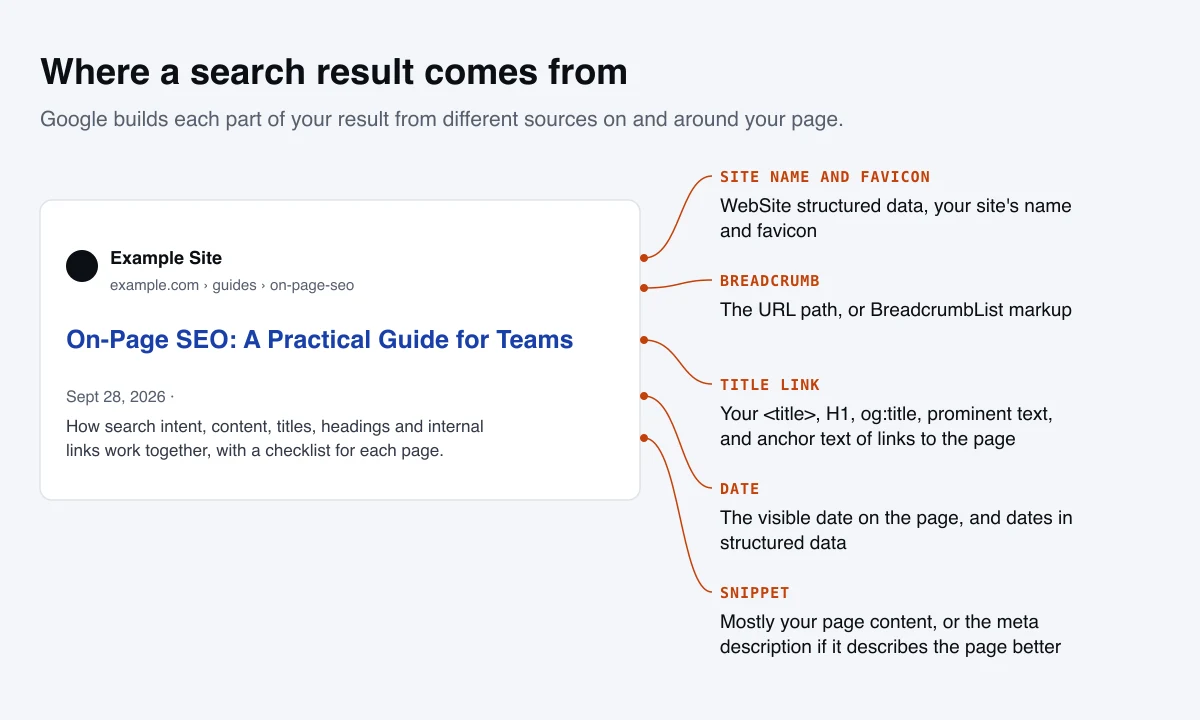
How Google creates the title link
The title in search results is called the title link, and Google generates it automatically. It draws on several sources:
- the
<title>element - the main visual title on the page
- heading elements such as the
<h1> - the
og:titlemeta tag - other large, prominent text
- other text on the page, and anchor text on the page
- the anchor text of links pointing to the page
- WebSite structured data, for the site name
So your <title> element is a strong suggestion, not a guarantee. Google is more likely to use something else when the title is missing, vague, stuffed with keywords, repeated across many pages, in a different language from the page, or out of step with what the page is actually about. After you change a title, Google has to recrawl and reprocess the page to notice, which can take from a few days to a few weeks.
How often titles get rewritten
A 2022 study by Zyppy of 80,959 URLs across 2,370 sites found Google rewrote 61.6% of titles. The patterns are useful:
- Length mattered at the extremes. Titles over 70 characters were rewritten 99.9% of the time. Titles of 51 to 60 characters had the lowest rewrite rate, around 39 to 42%.
- Matching the H1 helped. When a number appeared in both the title and the H1, Google kept it 97.3% of the time.
- Separators mattered. Google removed or replaced pipes 41.0% of the time, against 19.7% for dashes. Text in square brackets was removed completely 32.9% of the time.
Google has also been experimenting with rewriting headlines using AI. In March 2026 it confirmed to The Verge a “small and narrow” test in Search of AI-generated title rewrites, after a similar test in Discover. There’s no opt-out. The practical response is the same as for ordinary rewrites: a title that accurately and specifically describes the page gives Google the least reason to change it.
Writing titles that hold
Google’s own best practices, plus what the data shows:
- Give every page a unique title that describes that specific page. Avoid vague titles such as “Home” or “Services”, and boilerplate that repeats across pages with one word changed.
- Lead with the topic. Put what the page is about near the start, in the words a searcher would use.
- Keep it roughly 50 to 60 characters. Google has no limit and truncates titles to fit the screen, but that range is both where rewrites are rarest and where the full title usually shows.
- Match the H1. Keep the title and the main heading consistent, so both point Google at the same main title.
- Brand concisely. Add your site name at the end, after a dash or colon, where it helps, not a long tagline on every page.
- Don’t stuff or exaggerate. Repeated keywords make results look spammy, and Google’s helpful content questions warn against titles that exaggerate or shock.
On our own site, every service page and article has a unique title between 50 and 60 characters, and it’s one of the checks we run before a page goes live.
Meta descriptions and snippets
The snippet is the text under the title link. Google builds it primarily from the page’s content, choosing the passage that best fits the search, and uses the meta description when that describes the page better. So a single page can show different snippets for different searches.
What to know:
- Meta descriptions don’t affect rankings. Google said in 2009 that it doesn’t use the description meta tag in ranking, and it hasn’t said otherwise since.
- They can affect clicks. A description that accurately says what the page offers, and why it’s the right result, helps people choose it.
- There’s no length limit, but snippets are truncated to fit the device. We keep the descriptions on our own service pages and articles between 140 and 155 characters so they usually show in full.
- Make each one unique. Google recommends a distinct description for every page. For large sites, descriptions can be generated from the page’s own data, such as a product’s price, brand and key specifications.
- Many sites skip them. The 2025 Web Almanac found only about 67% of pages have a meta description, and the median length was 274 characters, far longer than what’s usually displayed.
If you need to keep part of a page out of snippets, the data-nosnippet attribute and the max-snippet rule do that, and they also apply to Google’s AI features.
Headings and page structure
Headings do two jobs: they let readers scan a page and find their section, and they tell search engines how the content is organized. Google also uses the main heading as one of the sources for the title link.
What Google says about headings is often misquoted. From its SEO Starter Guide: having headings in semantic order is fantastic for screen readers, but from Google Search’s perspective it doesn’t matter if you use them out of order, and there’s no ideal number of headings, though if a page feels like it has too many, it probably does.
So a strict heading hierarchy is not a ranking requirement. It’s still worth doing, for accessibility and for clarity:
- One H1 that states the topic, close to or matching the title. It’s a convention rather than a rule, but it removes any doubt about what the main title is. The 2025 Web Almanac found about 30% of pages have no H1 at all.
- H2s for the main sections, H3s for subsections within them, in order.
- Headings that say something. “Pricing” is weaker than “How much on-page SEO costs”. Where a section answers a question, a heading phrased like the question helps readers and matches how people search.
- Don’t use headings for styling. If text should look big but isn’t a section title, style it with CSS.
URLs
Keep URLs short, readable and stable: words rather than ID numbers, separated by hyphens. Google’s Starter Guide says keywords in the domain name or URL path have hardly any ranking effect beyond appearing in breadcrumbs, so there’s no need to force them in, and never a reason to change an established URL just to add one. Every URL change needs a redirect. We cover URL structure in the technical SEO guide.
Internal links and anchor text
Internal links are how search engines discover pages and understand how they relate, and how readers move from one useful page to the next. On most sites they’re also the most underused lever in on-page SEO.
Write descriptive anchor text. Google’s link guidance asks for anchor text that’s descriptive, reasonably concise and relevant to the page it links to. “Our guide to technical SEO” tells readers and Google what’s on the other side; “click here” and “read more” don’t. The anchor text of links pointing to a page is also one of the sources Google uses to write that page’s title link.
Link with purpose:
- Link from relevant, well-visited pages to the pages you most want to rank. A link from a strong guide to a service page passes both readers and context.
- Put the important links in the body text, where they carry context, not only in menus and footers.
- Build topic clusters: a main guide linked to and from the detailed pages on each subtopic.
- Make sure no important page is an orphan with no internal links pointing to it.
- Link to the final, canonical URL, not to one that redirects.
- Use natural variety in anchor text. Describe the target page honestly rather than repeating one exact phrase every time.
Link out, too. Linking to authoritative sources supports your claims, and clear sourcing is one of the trust questions in Google’s helpful content guidance. Mark links correctly: Google asks for rel="sponsored" on paid or affiliate links and rel="ugc" on links in comments and forum posts.
Images and video
Images can rank in Google Images, appear alongside regular results and AI answers, and make a page far easier to understand. Google’s image SEO guidance comes down to a handful of rules:
- Use real
<img>elements. Google doesn’t index images set as CSS backgrounds. - Write useful alt text. It’s the most important image attribute, for accessibility and for Google. Describe the image in context, without stuffing keywords. Google’s own example: “Dalmatian puppy playing fetch” is best; “puppy” is only better than nothing; a list of dog-related keywords is spam.
- Leave decorative images with empty alt text (
alt=""), so screen readers skip them. - Place images near relevant text. Google uses the surrounding content and captions to understand what an image shows.
- Use descriptive filenames. They’re a light clue:
black-kitten.jpgbeatsIMG00023.jpg. - Serve responsive, modern formats. Use
srcsetor<picture>for different screen sizes. Google supports WebP and AVIF alongside JPEG, PNG, GIF, SVG and BMP. - Don’t put important text only in images. Search engines and AI systems may not read it, and neither can many users.
- Choose a preferred image. Since March 2026, Google’s documentation explains how to suggest the image it shows for a page, using
primaryImageOfPagein structured data or theog:imagetag. Pick something relevant and representative, not your logo.
The 2025 Web Almanac found the median page provides alt attributes on only about 60% of its images. That’s an easy gap to close.
For video, give each important video its own page where it’s the main content, add a clear title, description and thumbnail, and use VideoObject structured data, following Google’s video best practices.
Structured data on the page
Structured data describes the facts on a page in a format machines can read without guessing. On-page, the types that matter most are Article (with the author and dates), BreadcrumbList, Product and Offer, Review, LocalBusiness and Organization. Two rules apply to all of them: mark up only what’s visible on the page, and validate before you publish. Structured data makes pages eligible for rich results but isn’t a ranking factor in itself, and several rich result types, including FAQ results, have been retired. The details are in our technical SEO guide.
E-E-A-T on the page: who, how and why
E-E-A-T stands for experience, expertise, authoritativeness and trustworthiness. It comes from Google’s quality rater guidelines, and it’s widely misunderstood. Google’s Starter Guide answers the question directly: E-E-A-T is not a ranking factor. Google’s helpful content guidance explains the relationship: its systems use a mix of factors that can identify content demonstrating these qualities, and of the four, trust is the most important.
Google suggests thinking about it as three questions you can answer on the page:
- Who created the content? Use bylines where readers would expect them, and link them to author pages with real background. In Article structured data, put only the author’s name in
author.nameand link to their profile or bio withauthor.url. - How was it created? Explain the method where it matters: how many products were tested and how, where the data came from, whether and how AI or automation was involved. Show evidence, such as photographs of real work.
- Why was it created? Google calls this perhaps the most important question. Content made to help people aligns with what its systems reward; content made mainly to attract search visits doesn’t.
Around the content, make trust easy to verify: a clear About page, real contact details, visible and correctly labeled publish and update dates, and sources for claims. The bar is higher for “Your Money or Your Life” topics, such as health, finance, safety and civic information, where the rater guidelines ask for the most care.
On-page SEO for AI answers
AI Overviews, AI Mode and AI assistants draw on the same pages and reward the same qualities: clear answers, specific and sourced facts, well-organized sections and original experience. Google says there’s no special optimization needed for its AI features beyond good SEO. The on-page habits in this guide are also what make a page easy to quote. We cover the differences, including how AI systems choose sources, in our AEO and GEO guide.
How to optimize an existing page
Most on-page wins come from improving pages that already exist and already get some impressions. A workflow that works:
- Pick the right pages. In the Search Console Performance report, look for pages with plenty of impressions but a low click-through rate, and pages averaging positions 5 to 20 for queries that matter to the business. Prioritize pages tied to revenue.
- Read the queries. Filter by the page and see which searches it actually appears for. You’ll often find it’s being shown for a different intent than the one it was written for.
- Check the results page. Search the main queries and compare your page’s format, angle and depth with what ranks.
- Fix the presentation. Rewrite the title and meta description to describe the page accurately and specifically for those searches.
- Improve the content. Answer the sub-questions the page misses, correct outdated facts, move the answer higher, and add first-hand evidence only you can provide.
- Tighten the structure. Clear headings, one topic per section, lists and tables where they fit.
- Add internal links in. Link to the page from your most relevant, most visited pages, using descriptive anchor text.
- Check images and structured data. Alt text, file weight, and markup that matches the visible content.
- Request a recrawl and measure. Use URL Inspection to request indexing for important pages, note the date of the change, and compare equal periods before and after, allowing for seasonality.
On timing: in our experience, impressions and click-through rate usually shift within two to four weeks on pages that are already indexed, while ranking movement typically takes four to eight weeks and depends on how competitive the query is. Change one page at a time where you can, so you know what worked.
What Google says doesn’t matter
A lot of on-page advice is inherited from how search engines worked fifteen years ago. According to Google’s own documentation:
| Common belief | What Google says |
|---|---|
| Meta keywords help rankings | Google doesn’t use the keywords meta tag |
| Pages need a target keyword density | There’s no density target; repeating keywords unnaturally is keyword stuffing, which is against spam policy |
| Longer content ranks better | Length alone doesn’t matter for ranking; Google has no preferred word count |
| Keywords in the domain or URL are important | They have hardly any effect beyond appearing in breadcrumbs |
| Headings must follow a strict order and count | Order and number don’t matter for Google ranking, though order helps screen readers |
| E-E-A-T is a ranking factor | It isn’t a ranking factor in itself |
| Changing dates makes content fresher | Changing dates without substantial changes doesn’t help, and Google lists it as a warning sign |
| Duplicate content brings a penalty | Duplicate URLs on your own site are inefficient but not penalized; copying others’ content is different |
| Meta descriptions affect rankings | They’re used for snippets, not ranking |
Sources: Google’s SEO Starter Guide, helpful content guidance and spam policies.
None of this means those elements are useless. A clear H1, a sensible heading order and a well-written meta description still help readers and clicks. They just aren’t ranking levers, and time spent polishing them rarely beats time spent improving the content.
An on-page SEO checklist
Before writing
- The target search and its intent are clear, and the format matches what ranks
- No other page on the site targets the same intent
Content
- The main answer or point comes early
- The page covers the sub-questions a searcher is likely to have
- Claims are specific and sourced; first-hand experience is included where you have it
- Facts are current, and the visible date is accurate
Presentation
- A unique, specific title of roughly 50 to 60 characters, consistent with the H1
- A unique meta description that says what the page offers, roughly 140 to 155 characters
- One H1, with H2s and H3s that describe their sections
- A short, readable URL
Links and media
- Internal links in from relevant pages, with descriptive anchor text
- Links out to primary sources, with paid links marked
sponsored - Every meaningful image uses
<img>with descriptive alt text
Trust and markup
- A byline linked to an author page, where readers would expect one
- Structured data that matches the visible content and validates
Where on-page SEO fits
On-page SEO sits between the other two layers. It depends on technical SEO to make pages crawlable and indexable, and it gives off-page work, the links and mentions a site earns, something worth pointing at. It’s also where content strategy turns into individual pages: deciding which searches deserve a page is strategy; making each page the best answer is on-page SEO.
For local businesses, the same principles apply to location and service-area pages, alongside the work covered in local SEO. For online stores, they apply at scale to category and product pages, which is much of what ecommerce SEO involves. If you’d like your most important pages reviewed and fixed, our on-page SEO service does exactly that, page by page.