 Crawllexa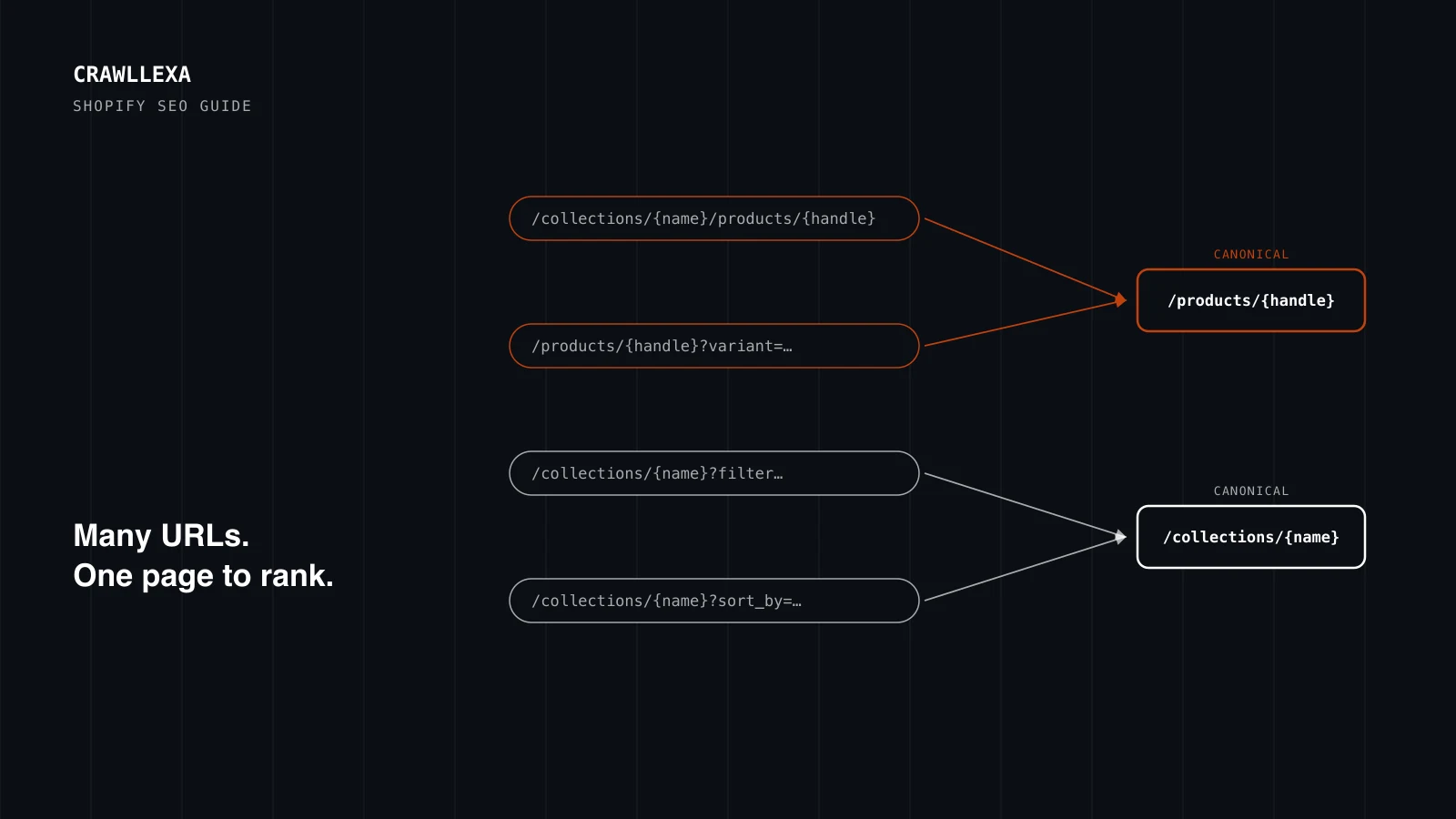
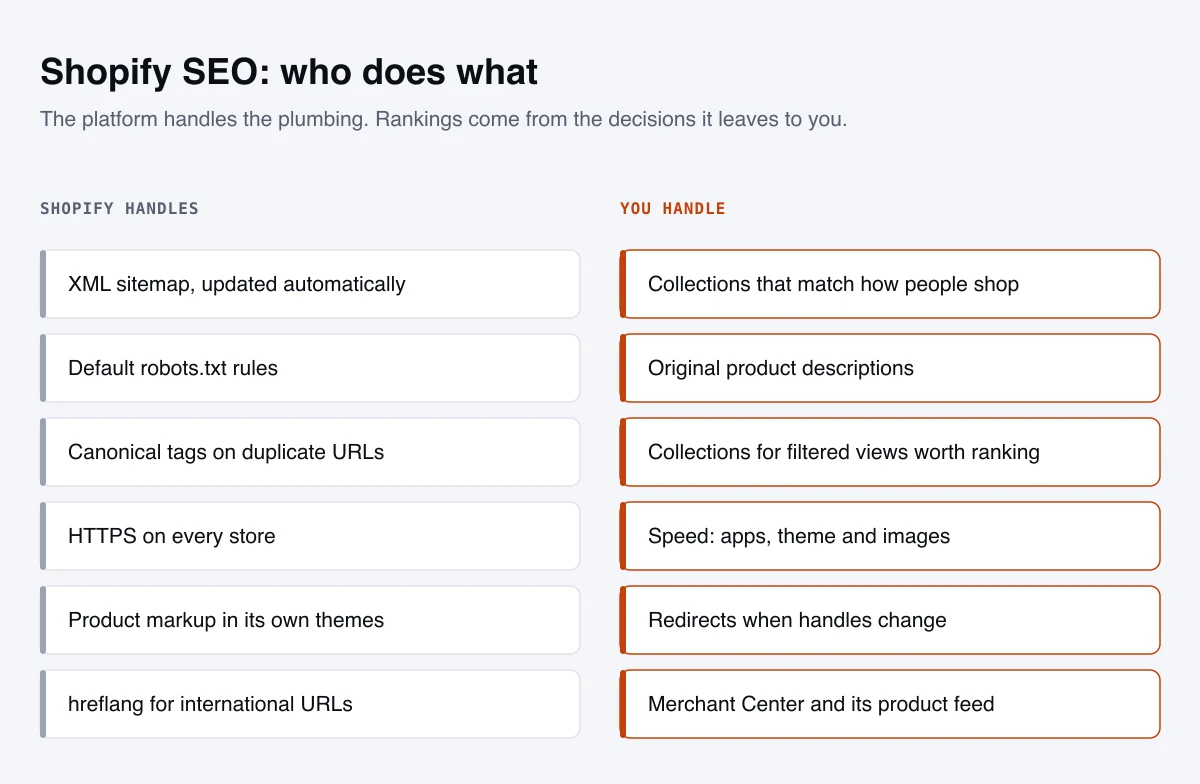
Shopify gets more of the SEO basics right out of the box than most platforms. It writes your sitemap and robots.txt, adds canonical tags, turns on HTTPS and ships themes with product markup. It also makes some decisions for you that you can’t undo, like the shape of every URL in your store. Good Shopify SEO starts with knowing which is which: what the platform handles, what it leaves to you, and where its defaults need help.
This guide covers all three. It’s based on Shopify’s own documentation, Google’s guidance for online stores, and checks we ran on live Shopify stores in October 2026, so you can see how the defaults actually behave rather than how they’re assumed to.
The short version
- Shopify handles the plumbing. Sitemaps, robots.txt, canonical tags, HTTPS and basic product markup are automatic. Check them; don’t rebuild them.
- The URL structure is fixed.
/products/,/collections/,/pages/and/blogs/can’t be changed, only the handle after them, and that has little ranking effect anyway. - Duplicate URLs are handled by canonical tags. Product URLs inside collections and variant URLs point to the main product; filtered and sorted collections point to the unfiltered collection.
- So filters don’t rank on their own. If a filtered view like “black boots” deserves to rank, give it its own collection.
- Collections are your category pages, and usually your best commercial ranking assets. Give each important one a unique title, description and introduction.
- Apps are the biggest speed risk, and uninstalling an app doesn’t remove its code from your theme.
- Recheck structured data after every theme or app change, and connect Merchant Center for free product listings.
- Give each international market its own subfolder or domain. Markets that share a URL aren’t indexed separately.
What Shopify handles for you
| Feature | What Shopify does | What to check |
|---|---|---|
| XML sitemap | Generates /sitemap.xml, with separate sitemaps for products, collections, blogs and pages, and updates it automatically |
Submit it in Search Console and Bing Webmaster Tools. It can’t be read while the store is password-protected |
| robots.txt | Generates default rules that keep crawlers out of admin, cart, checkout and account pages and common crawl traps | Leave the defaults alone unless you have a specific reason |
| Canonical tags | Adds them to every page automatically | That they point to the URL you want indexed |
| HTTPS | Turns on SSL certificates by default | That every page and resource loads over HTTPS |
| Title tags | Themes generate titles, usually with your store name added | That the full title still reads well and isn’t cut off |
| Structured data | Themes include product markup | That it’s valid, and that no app has added a second copy |
| hreflang | Creates tags automatically for international domains and subfolders | That each market has its own URL |
| Redirects | Offers to redirect the old URL when you change a handle | That the option stays ticked |
Most of this comes from Shopify’s SEO overview and its sitemap documentation. The practical consequence: Shopify SEO is rarely about building infrastructure. It’s about the content, structure and decisions the platform leaves to you.
Shopify’s URL structure, and what you can change
Every Shopify URL follows the same pattern. Products live under /products/, collections under /collections/, pages under /pages/ and blog posts under /blogs/ followed by the blog’s name. You can edit the handle, the part after the last slash, in each item’s search engine listing, but not the prefixes in front of it.
That bothers people more than it should. Workarounds exist, but they add redirects and complexity for very little gain: Google’s SEO Starter Guide says keywords in the URL path alone have hardly any effect beyond appearing in breadcrumbs. What matters more:
- Short, readable handles. Shopify creates a handle from the title, so a long product title becomes a long URL. Trim it to the words that describe the product.
- Stable handles. Every handle change is a URL change, and Google says changing URLs can cause ranking fluctuations while it recrawls and reindexes the site. Settle handles before launch and change them only for a good reason.
- A redirect whenever you do change one. When you edit a handle, Shopify offers to create a redirect from the old URL. Keep it ticked. Shopify’s URL redirects are permanent 301s, with room for up to 100,000 per store, or 20 million on Shopify Plus. They only apply to broken URLs: if the old address still loads a page, the redirect won’t fire.
Duplicate URLs, and how Shopify handles them
A single Shopify product is often reachable at more than one address:
/products/{handle}, the main URL/collections/{collection}/products/{handle}, when the theme links to products “within” a collection/products/{handle}?variant={id}, when a shopper picks a size or color
Shopify’s developer documentation for the within filter, which themes use to generate those collection links, warns that the two versions have the same content on separate URLs, so you should consider the SEO implications.
Canonical tags take care of most of it. Here’s what we found on live Shopify stores in October 2026:
| URL | Canonical tag points to |
|---|---|
/collections/{collection}/products/{handle} |
/products/{handle} |
/products/{handle}?variant={id} |
/products/{handle} |
/collections/{collection}?filter.p.product_type=… and other filters |
/collections/{collection} |
/collections/{collection}?sort_by=… |
/collections/{collection} |
/collections/{collection}?page=2 |
Itself, ?page=2 |
The last row matches Google’s pagination guidance: give each page in a sequence its own canonical, rather than pointing them all at page one.
Canonical tags are hints, though, not commands. Google’s documentation on consolidating duplicate URLs recommends linking to the canonical URL rather than a duplicate, because consistent links help it understand your preference. So the best fix is upstream: if your theme links products through collection URLs, have your developer switch those links to plain /products/ URLs. In the Page indexing report, the duplicate URLs show up as excluded duplicates or alternates. That’s normal; it means Google found the main version.
Collections are your category pages
Most commercial searches for a type of product land on a collection, because the searcher wants a range of options, not one item. Treat each important collection as a landing page:
- A title and meta description written for the search, not just the collection’s name. Shopify lets you enter up to 70 characters in a title but recommends keeping it to 60 so it isn’t shortened in results.
- A short introduction in the collection description that helps shoppers choose: what’s in the range, how the options differ, and sizing or material notes. Keep it brief enough that products still appear without scrolling.
- Links to every product in it. Google’s guidance on ecommerce site structure says category pages should link to all the products you want indexed, because Googlebot generally doesn’t submit searches into your search box. Products it can’t reach through links need a sitemap or a Merchant Center feed.
- Pagination with real links. Google’s crawlers follow links in
<a href>elements; they don’t click “load more” buttons or trigger infinite scroll. If your theme loads products that way, make sure it also renders links to the?page=2URLs.
Filters, sort orders and tags
Shopify’s storefront filters add parameters to collection URLs, such as filter.v.option.color=red or filter.p.product_type=shoes. Combined with sort orders, a single collection can generate a huge number of URLs. Shopify’s defaults keep that in check:
- The default robots.txt we checked in October 2026 blocks sorted collection URLs, collection URLs that combine two or more filters, and collection and blog URLs that combine tags with a plus sign. Single-filter URLs stay crawlable.
- Canonical tags point filtered and sorted URLs to the unfiltered collection, as the table above shows.
That’s a sensible default for most stores, and it follows Google’s guidance on faceted navigation, which recommends preventing crawling of filter URLs you don’t need indexed. The consequence is that filtered views don’t rank as pages in their own right.
If people do search for a filtered view, such as a color, material or style within a category, create a collection for it. Automated collections can pull in products by conditions such as product type, vendor, tag or price, and the new collection gets its own URL, title, description and place in your navigation. Do this only where there’s real search demand, which keyword clustering helps you judge; otherwise you recreate the thin pages the defaults avoid.
Tag pages need the same judgment. Shopify’s tag filtering creates URLs such as /collections/{collection}/{tag} and /blogs/{blog}/tagged/{tag}. Single-tag pages are crawlable by default and often thin, repeating products or posts that appear elsewhere. If yours add nothing, keep them out of the index with a noindex tag rather than blocking them in robots.txt, so search engines can still crawl them and see the tag.
Product pages
- Titles with room for your store name. Many themes, including Shopify’s own Dawn, add a dash and your store name to every title unless it’s already there. Count it when you check length; our SERP Preview shows how a title will look in results.
- Your own descriptions, at least for the products that matter most. Manufacturer copy appears word for word on every store that sells the product. Google’s guidance on helpful content asks whether a page mainly summarizes what others have to say without adding much value, which is exactly what reused copy does.
- The details shoppers need. Shopify’s advice on optimizing a store for AI lists detailed specifications, comparisons with similar products, sizing guides, and material and care information. The details that help a shopper decide also help search engines and AI shopping tools understand the product.
- Descriptive alt text on product images. Shopify’s guidance is to describe what the image shows, not what you want someone to think about it.
- Variants on one page. Sizes and colors usually belong on a single product page. Shopify’s own themes, such as Dawn, already mark them up as one product group, which is the format Google’s product variant documentation describes.
- Out-of-stock and discontinued products decided page by page. Keep temporarily unavailable products live, with their availability shown and alternatives linked. For discontinued products, redirect the ones with traffic or links to the closest replacement or their collection, and let the rest return a 404.
Structured data and Merchant Center
Shopify says its themes automatically include product markup. Under the hood, the structured_data filter outputs a Product for items without variants and a ProductGroup for items with them.
Google’s product structured data guide separates product snippets, for pages where people can’t buy, from merchant listings, for pages where they can. Store product pages qualify for merchant listings, which support details such as shipping and return policies. Google also recommends describing your return and shipping policies in markup nested under your organization.
Three checks keep the markup healthy:
- Run the Rich Results Test on a product page after every theme change or app install.
- Make sure each page has one consistent product entity. Some review and SEO apps add markup of their own, which can duplicate or contradict the theme’s.
- Watch the Merchant listings and Product snippets reports in Search Console for errors.
Beyond markup, connect Merchant Center. Shopify’s Google & YouTube app syncs your products to Google Merchant Center, and Shopify says approved products may be eligible for free listings across the Shopping tab, Search, Images, Maps and Lens.
Speed: themes, apps and images
Shopify’s web performance reports, on the Themes page of your admin, show Largest Contentful Paint, Interaction to Next Paint and Cumulative Layout Shift from real visitors over the past 30 days. Search Console’s Core Web Vitals report shows the same metrics from Chrome’s field data. The thresholds and fixes are covered in our technical SEO guide.
On Shopify specifically, Shopify’s own advice on improving web performance points to four levers:
- Apps. Weigh each app’s value against its performance cost, and remove the ones that aren’t essential. Uninstalling an app doesn’t automatically remove its code from your theme; you may need removal instructions from the developer.
- Themes. Use an up-to-date theme. Shopify says its Horizon and Online Store 2.0 themes are free and optimized for performance, and warns that stacking many sections on one template slows pages down.
- Images. Size images to how they’re displayed, compress them, and show fewer on heavy pages.
- Tag managers. Remove unused and low-value tags.
International stores
Shopify Markets lets each market use its own domain, subdomain or subfolder. When it does, Shopify creates hreflang tags automatically for every international domain or subfolder, and adds each language to your sitemaps.
- Give every market that matters for search its own URL. Shopify’s documentation on automatic redirection notes that markets on shared domains aren’t indexed by search engines.
- Submit the sitemap for each international domain in Search Console.
- Be careful with automatic redirection. Google advises against automatically redirecting visitors between language versions based on assumptions, because it can stop people and search engines from reaching every version. If you turn it on, keep a visible market selector and confirm with URL Inspection that Google can reach each version.
For hreflang in general, see the international section of our technical SEO guide.
Content beyond products
Collections and products answer “show me” searches. Shopify’s built-in blog is where you answer the rest: buying guides, comparisons, how-to and care guides, the questions people ask before they’re ready to buy. Link each article to the collections and products it discusses.
Keep the roles clear. A buying guide shouldn’t compete with the collection it supports for the same commercial search; when it does, you get keyword cannibalization. The guide owns the question, the collection owns the purchase, and they link to each other.
Hiding pages and editing robots.txt
To keep a page, blog post or product out of search, Shopify supports an seo.hidden metafield. Set it to 1 and the item is hidden from sitemaps, search engines and your store’s own search. For pages you want in store search but not in search engines, Shopify documents a theme snippet that adds a noindex tag by handle.
Don’t use robots.txt to hide pages. A crawler that can’t fetch a page never sees its noindex, so a blocked page can stay indexed. Our technical SEO guide explains the difference.
You can edit robots.txt through a robots.txt.liquid template, but Shopify calls it an unsupported customization and warns that incorrect use can result in loss of all traffic. If you need a change, such as blocking a parameter or adding a sitemap, use Liquid to add or remove individual rules, so Shopify can keep updating the defaults. Our AI Crawler Checker shows what your rules allow for search and AI crawlers.
Moving to Shopify without losing traffic
Because Shopify’s URL prefixes are fixed, almost every URL changes when you move from another platform. That’s manageable if you plan it:
- Map every old URL that has traffic, links or rankings to its new Shopify equivalent before launch.
- Add 301 redirects for all of them in Shopify’s URL redirects. The old URLs will be broken after the move, which is exactly when Shopify’s redirects apply.
- Carry over titles, descriptions and content, so the new pages are recognizably the same pages.
- Follow Google’s site move guide, submit the new sitemap and watch the Page indexing and Performance reports for the following weeks.
Our technical SEO guide covers migrations in more depth, and our web design and development work plans the move with these steps built in.
Do you need an SEO app?
Apps can automate useful jobs: alt text, title templates, redirect management, broken-link monitoring. But before you install one, check what Shopify already does. Sitemaps, canonical tags, robots.txt and basic product markup are built in, and an app that adds them again either does nothing or creates duplicates, such as a second set of structured data.
No app fixes thin collections, copied descriptions or a slow theme. Those come down to decisions about structure and content, which is where most Shopify SEO gains are.
A Shopify SEO checklist
Setup
- The store isn’t password-protected, and the sitemap is submitted in Search Console and Bing Webmaster Tools
- The default robots.txt is in place, or customized deliberately through Liquid
- Every page and resource loads over HTTPS
URLs and duplicates
- Handles are short, readable and stable, with a redirect for every change
- The theme links to
/products/URLs, not collection-aware URLs - Canonicals checked on a product, a variant, a filtered collection and page 2 of a collection
Collections and products
- Priority collections and products have unique titles and descriptions, with titles that fit once the store name is added
- Collection introductions help shoppers choose, and every product is linked from a collection
- Filtered views with real search demand have their own collections; thin tag pages are kept out of the index
- Top products have original descriptions, and images have descriptive alt text
- Out-of-stock and discontinued products are handled by traffic and links, not a blanket rule
Markup and feeds
- Product structured data is valid, with one copy per page
- Return and shipping policies are described where possible
- Merchant Center is connected through the Google & YouTube app
Speed
- Core Web Vitals pass on mobile in Shopify’s web performance report and in Search Console
- Unused apps are removed, along with any code they left behind
International and content
- Each market that matters for search has its own domain or subfolder, with hreflang tags and a submitted sitemap
- Blog posts answer pre-purchase questions and link to the collections they support
Where Shopify SEO fits
Shopify gives you a sound technical base. Rankings come from what you build on it: collections that match how people shop, product pages worth reading, and a store fast enough that its apps don’t undo its theme. For larger catalogs, the same principles apply at scale, which is what our e-commerce SEO work covers, alongside shopping ads and email in our e-commerce marketing work. If you’d like your store checked against this list, start with a free SEO audit.